

INTELLIGENT SYSTEM DESIGN
Transform Your Ops with Asana AI Studio
We help forward-thinking teams integrate intelligent agents directly into their workflows to save time, reduce burnout, and unlock next-level efficiency.


TRUSTED BY INNOVATING TEAMS AROUND THE WORLD













What is AI Studio?
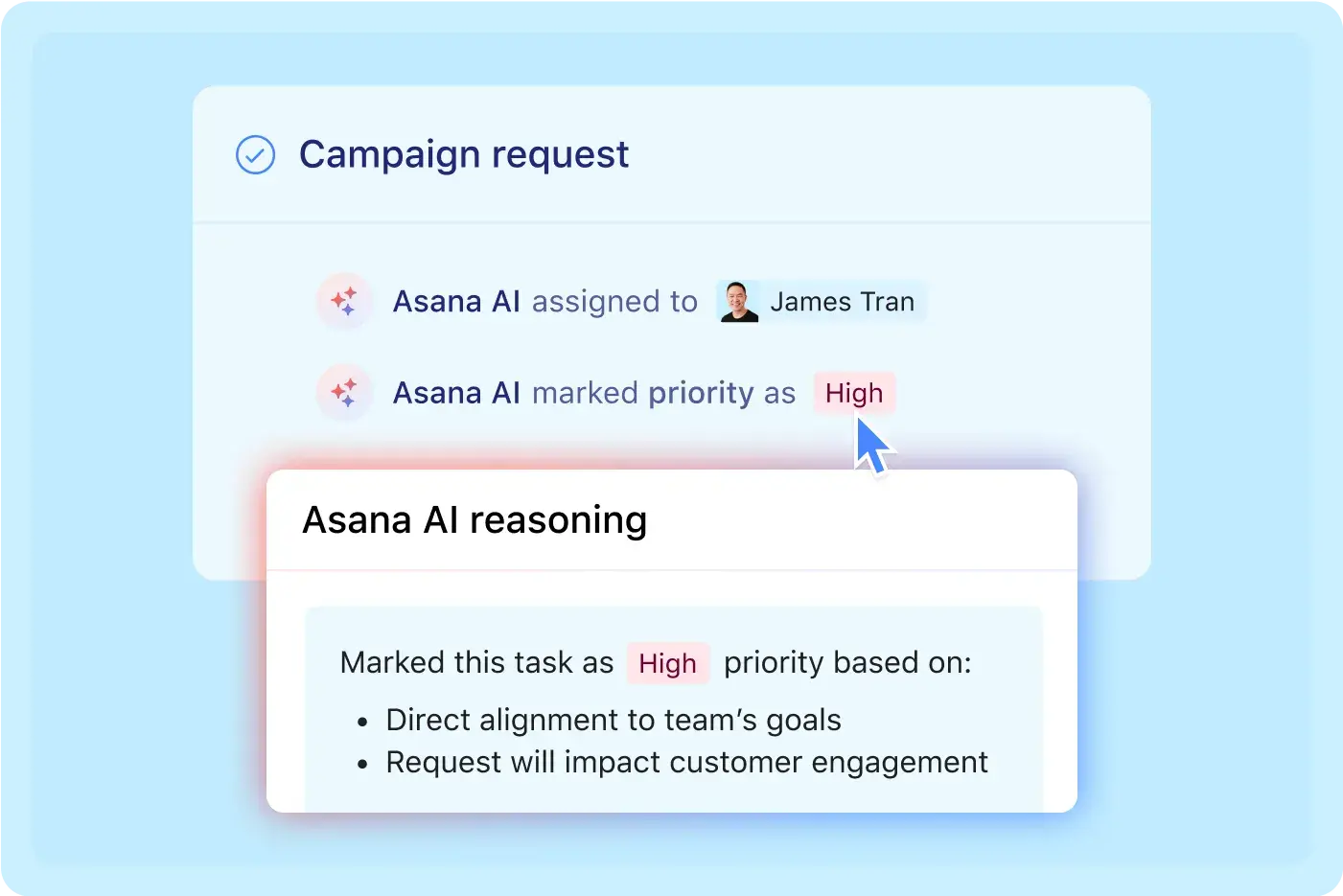
AI Studio is a no-code workflow builder that lets teams create “Smart Workflows” directly inside Asana. These intelligent systems handle repetitive work, make decisions, and route tasks based on natural language instructions.
Asana’s AI Studio allows you to:
Automate complex, cross-functional workflows
Generate documents, decisions, or assignments based on real-time data
Train AI agents to understand your business logic and act on it—inside your Asana projects
And we don’t just set it up. We build it with you, for the way you work.
AI-POWERED WORKFLOW DESIGN
What We Can Build with AI Studio
Because your team’s time is too valuable for busywork.
SALES
Select to view detailsMARKETING
Select to view detailsHUMAN RESOURCES
Select to view detailsIT & OPS
Select to view detailsPROJECT MGMT
Select to view details
AI Studio Use Cases
Sales - Lead Management
Automatically score and route leads to the right reps with intelligent prioritization.
Explore Sales solutionMarketing - Campaign Brief Generator
Generate complete campaign plans with tasks, deadlines and content requirements.
Explore Marketing solutionHR - Onboarding Workflow
Automate new hire setup with personalized task lists and equipment provisioning.
Explore HR solutionIT - Software Evaluation & Rollout Tracker
Automate the collection of input, flag blockers, and create rollout plans.
Explore IT solutionProject Management - Project Kickoff Briefs
Automatically generate comprehensive project plans from initial requirements.
Explore Project Management solutionPMO - Project Intake & Triage Workflow
Automatically capture, score, and route work based on strategic alignment.
Explore PMO solutionHealthcare - Research Study Validation Tracker
Automatically collect study ideas, assess feasibility, and generate research project kickoffs.
Explore Healthcare solutionExplore AI-powered workflows across departments.
How to Get Started
We make it easy to move from curiosity to clarity, with zero pressure.

Book a Strategy Session
Schedule a consultation with our experts to discuss your needs.

Identify High-Impact Use Cases
We'll pinpoint workflows that are slowing your team down.

Design and Build
We implement your first smart workflow to demonstrate value.

Test, Improve, and Expand
We refine and expand based on feedback and measured results.
FAQs
-
Regular Asana rules follow fixed logic—like “If a task is moved to this column, assign it to this person.” They’re great for straightforward, predictable workflows.
AI Studio goes a step further. It uses natural language instructions and large language models (LLMs) to interpret context and make more nuanced decisions.
For example, instead of just reacting to a trigger, AI Studio can:
Read a project brief and assign it based on content type
Summarize a long task description and generate next steps
Choose approvers based on the language of a request
Pull related tasks from past projects to inform a decision
It’s dynamic, context-aware, and flexible—ideal for cross-functional workflows that can’t be easily automated with standard “if this, then that” logic.
-
No. AI Studio is available as a paid add-on, not included by default in Asana’s Advanced, Enterprise, or Enterprise+ plans. Access must be enabled in the admin console by a super admin or billing owner.
-
No. Asana and its AI partners (OpenAI, Anthropic, AWS Bedrock) do not use customer data to train or improve their models. All data is deleted immediately after the AI completes its task.
-
Yes. AI features can be enabled or disabled in your admin console. Super admins and billing owners control access. You can also configure which teams or divisions have access to AI Studio.
-
Some examples include:
Auto-routing intake forms to the right team
Generating project briefs or assignments from freeform text
Summarizing meeting notes into tasks
Triggering multi-step approval flows with human review
Searching internal tasks and history for relevant decisions
-
Asana AI Studio uses credits to process AI tasks. Every time your workflow uses AI to generate an output—like assigning a task based on a brief, summarizing content, or making a decision—credits are consumed.
The number of credits used depends on the complexity of the action. For example, summarizing a long task or evaluating custom instructions might use more credits than a basic AI assignment.
Credits are purchased separately as part of the AI Studio add-on and are tracked in your admin console. Your credits are not shared with other AI features in Asana—they're specific to workflows built in AI Studio.
Cirface helps you estimate how many credits a typical workflow might use during your strategy session, so you know what to expect before launching anything.

Why Leaders Trust Us to Streamline Their Workflows
-
![Amanda Neo4j]()
"Cirface showed us instead of just telling us how our intake process could improve with our Asana implementation which was a really big ‘ah-ha’ moment and a huge change for a lot of our marketers."
— Amanda Scigaj, Neo4j
-
![Vitor Malta Eventbrite]()
"We partnered with Cirface to implement Asana across our department, and the experience exceeded all expectations. What stood out most was their creative approach to overcoming obstacles. They didn't just provide solutions; they worked closely with us to understand our challenges and crafted strategies that fit perfectly into our workflows."
— Vitor Malta, Eventbrite
-
![Irene Cheung MLB]()
"Fantastic and plentiful work! These custom project templates and automation workflows were right on the nose!"
— Irene Cheung, Major League Baseball
-
![Sam Zaweet CF]()
"We can finally see everything in one place!"
— Sam Zaweet, Cadillac Fairview
-
![A smiling young man with a beard and glasses, wearing a navy blue shirt, standing in front of a light green background.]()
“Would recommend Cirface to anyone looking to improve their operations.”
— Marcel Petitpas, Parakeeto
-
![Darrell Evans]()
"The experience was nothing short of amazing. The team at Cirface was systematic, laid out a clear and concise plan and timeline that met our goals. The best part was the check-ins to make sure we were on track. Marquis and his team crushed it for our firm."
– Darrell Evans, Yokel Local
-
![A man with short blond hair and a beard, smiling in a dimly lit setting.]()
"The Cirface team are systems gurus."
— Kyle Dutka, PB+J
-
![Liz Hepburn AIHR]()
“We're much more equipped to continue developing, iterating, and refining processes to be more effective and efficient as we scale.”
— Liz Hepburn, AIHR
-
![A smiling woman with long light brown hair, wearing glasses, a white off-shoulder top, and a pink scarf, sitting in an office with colorful artwork on the wall.]()
"I'm forever grateful for what Cirface did for me and my team."
— Fran Groesbeck - Ten Touch Creative Agency
-
![A smiling Black man wearing glasses and a navy and white striped t-shirt]()
"Working with Cirface was an excellent adventure."
— Bart Anestin, Creative Partner
-
![Amanda Hurd]()
"Cirface really helped our team think through our processes, and workflows as a company, in order to implement a standard of "how we do things around here" that would position us for scalability, all the while streamlining processes, and filling in the gaps."
— Amanda Hurd, Yokel Local












SUCCESS STORIES









TECHNOLOGY PLATFORMS