
Short answer: teams rarely miss goals for lack of effort. The usual causes are manual tracking scattered across tools, goals with no shared framework, targets set for the team instead of with them, daily work disconnected from the outcome, and no owner or review rhythm after kickoff. The fix is one visible system that connects goals to the work that moves them.
A missed goal is rarely caused by one bad decision. More often, the goal was difficult to see, difficult to measure, or disconnected from the work people were doing every day.
I often hear leaders say, “We had a plan. We talked about it at the kickoff. Then the year got busy.” That is rarely a motivation problem and usually a work system problem.
When goals live in a spreadsheet, a slide deck, a planning meeting, and someone’s memory at the same time, keeping them current becomes a job of its own. The team may still be working hard, but it becomes harder to answer a basic question: Are today’s priorities moving us toward the outcome we said mattered?
Here are five common reasons teams miss their goals, plus practical ways to prevent the same pattern next year.
1. Goal tracking happens manually
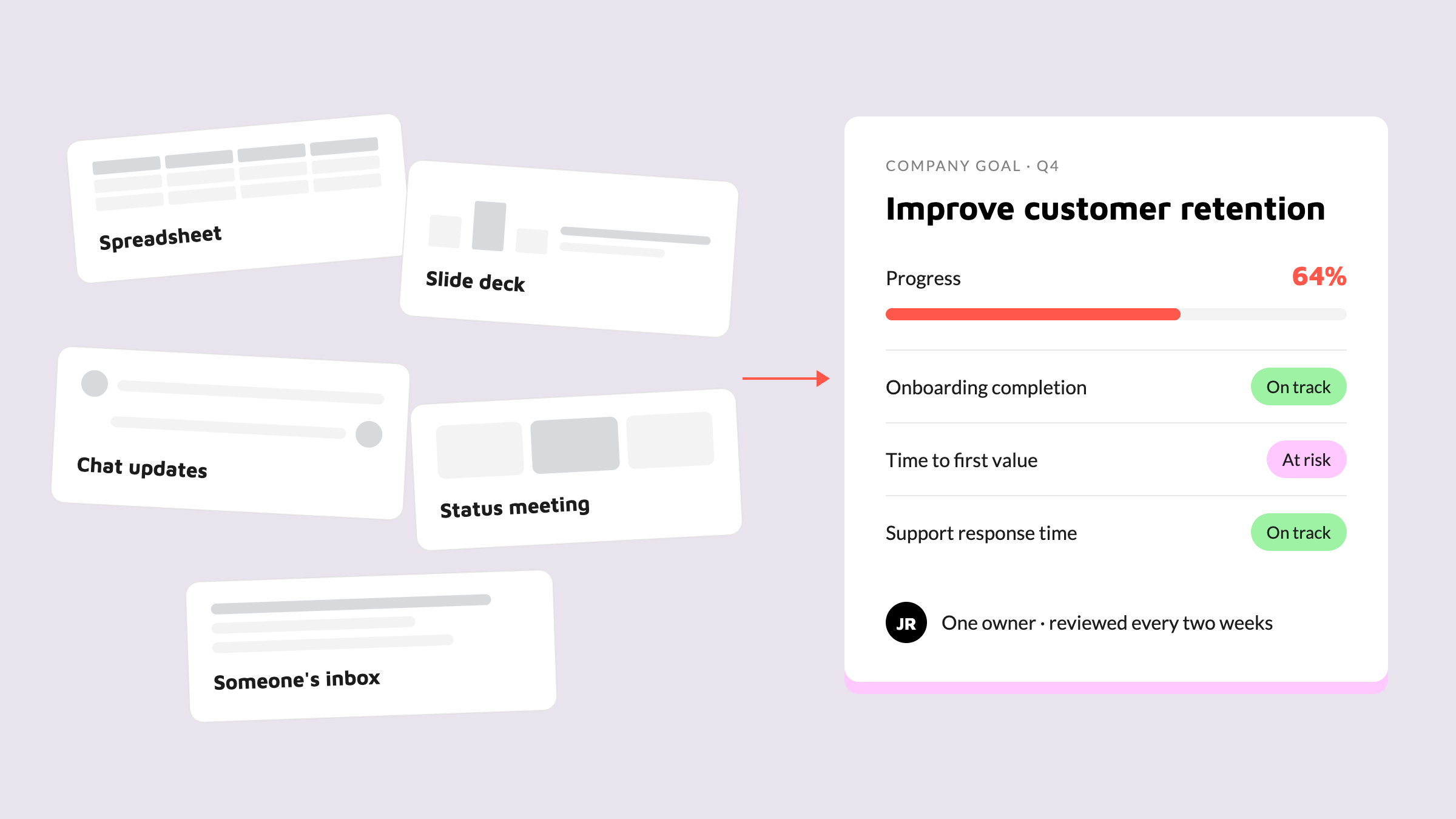
Many teams track goals across spreadsheets, slide decks, status meetings, and a collection of updates in chat. Each format has a purpose, but none is a reliable home for the whole picture.
Manual tracking creates predictable problems:
Someone has to collect progress from several places.
Updates become stale between meetings.
Different teams use different definitions of “on track.”
Leaders spend review time reconciling numbers instead of making decisions.
Team members cannot easily see how their work affects the larger outcome.
A marketing team may update campaign results in a spreadsheet, while the sales team reports pipeline progress in a slide deck. The leadership team then discusses both in a meeting and records a final summary somewhere else. By the time the summary is ready, the underlying numbers may already have changed.
How to avoid it
Choose one visible source of truth for goals. It does not need to replace every detailed system your team uses, but it should show the goal, the owner, the measurement, the current status, and the work contributing to it.
Start with a small set of goals and agree on a simple update rhythm. A system that people keep current is more useful than a perfect dashboard that nobody opens after the kickoff.

2. There is no shared framework behind the goals
A goal can sound inspiring and still be impossible to manage. “Improve customer experience” or “grow the business” may be important, but they do not tell a team what success looks like, how progress will be measured, or what should happen first.
A framework gives goals enough structure to be useful. That might be OKRs, OGSM, the Balanced Scorecard, or another model that fits the organization. The label matters less than answering a few practical questions:
What outcome are we trying to achieve?
How will we know we achieved it?
What is the baseline and target?
What work will contribute to the result?
Who owns the outcome?
When will we review progress?
For example, a nonprofit might set the objective “Make our food-access program easier to reach.” Its key results could include increasing completed applications, reducing average response time, and expanding coverage to a defined number of neighborhoods. The framework turns a broad intention into outcomes the team can discuss and act on.
How to avoid it
Pick one framework and use it consistently for at least one planning cycle. Do not make every team invent its own version of a goal. Create a shared definition of an objective, a key result, an owner, a baseline, and a target.
The goal is not to win an OKR terminology contest. The goal is to make it obvious what the team is trying to change and how progress will be judged.
3. Leaders create goals for the team, not with the team
Leaders are responsible for aligning team goals with company strategy. That does not mean they need to write every goal in isolation.
When goals arrive fully formed from above, the people expected to deliver them may not understand the tradeoffs behind them. They may also see risks that were invisible during leadership planning, such as unrealistic capacity, dependencies on another team, or customer needs that have shifted.
Co-creation does not mean every person gets a veto. It means the team has a chance to contribute context before the goal is finalized. That conversation often improves the goal and makes ownership more real.
A product team, for example, may be asked to improve activation. Leadership may initially suggest a target based on a company growth plan. In a workshop with the team, the group may discover that onboarding friction is concentrated in one user segment and that a smaller experiment should come before a broad redesign. The final goal can still support the company strategy, but the path is more grounded in the team’s actual work.
How to avoid it
Bring the team into the goal-setting process before the wording and targets are locked. Ask:
What would make this goal meaningful to you?
What could prevent us from achieving it?
Which dependencies do we need to address?
What work should stop, start, or change?
What would a realistic but ambitious target look like?
Then make the final alignment explicit. People should be able to see how their input shaped the plan and how the goal connects to the wider strategy.
4. Day-to-day work is disconnected from the goals
This is the gap that causes the most frustration. A team can understand its goals and still spend most of its time working on tasks that are not clearly connected to them.
When the connection is missing, priorities are often decided by urgency, the loudest request, or whichever project has the most recent meeting. Goal reviews become a separate activity instead of a way to guide work.
Consider an operations team with a goal to reduce customer onboarding time. If the goal sits in a quarterly presentation while the team’s tasks live in unrelated projects, it is difficult to see which improvements are contributing, which dependencies are blocking progress, and which requests are distractions. The team may complete dozens of tasks without moving the outcome.
How to avoid it
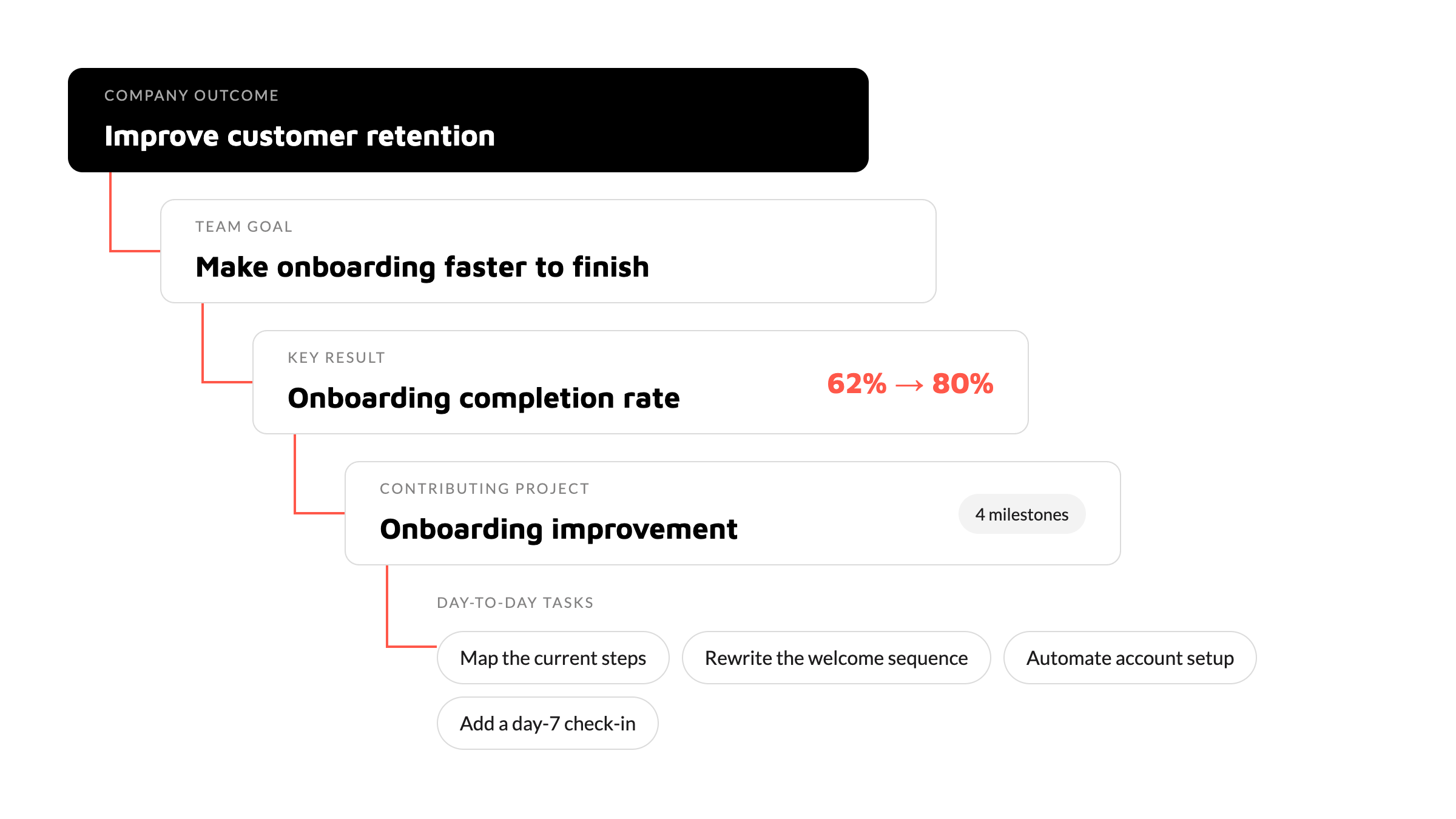
Link goals to the projects, milestones, and tasks that contribute to them. Make the connection visible during planning and prioritization, not just during the end-of-quarter review.
In Asana, this is where Goals can be useful. A team can define a parent goal or objective, add measurable sub-goals or key results, and connect relevant projects or milestones as contributing work. Progress can update from a configured source instead of requiring someone to copy every number into a presentation for every review. The exact progress behavior depends on the goal type and the selected progress source, so the setup needs to be intentional.
The practical test is simple: Can a team member open a current priority and understand which goal it supports? Can a leader open the goal and see the work behind the progress? If not, the strategy and execution layers are still too far apart.
5. Goals are treated as a launch event, not a management system
A goal-setting workshop can create energy. It cannot manage the goal for the rest of the year.
Teams miss goals when nobody is clearly responsible for keeping the goal current, checking assumptions, raising blockers, or deciding what to do when progress slips. A goal can be well written and still disappear under the next quarter’s priorities.
How to avoid it
Give every goal one accountable owner. Agree on a review cadence, define what “at risk” means, and decide how changes will be recorded. A useful review is not just “What percentage are we at?” It also asks:
What changed since the last review?
Which work is contributing most?
What is blocked?
Is the target still realistic and strategically useful?
What decision or support is needed next?
Use progress updates to capture context, not just a number. Asana can also support the cadence by creating a task for the goal owner to update progress weekly, every two weeks, monthly, or quarterly. That gives the owner a clear prompt and keeps the update from depending on memory.
Choosing a platform to connect goals to work
Once a team recognizes that manual tracking and disconnected work are part of the problem, the next question is often, “Which tool should we use?”
Before looking at individual platforms, it helps to separate two broad categories. Some tools are built specifically for goal tracking and OKRs, such as WorkBoard and Lattice. They can offer a focused, well-designed experience because goal management is their primary purpose. That focus can be valuable, especially for teams with a mature goal-setting practice. The tradeoff is that goal tracking may sit apart from the projects, tasks, and other execution work where people spend their time. Teams then have to maintain the connection between strategy and day-to-day delivery. Other platforms, including Asana, monday.com, and ClickUp, bring goal tracking closer to the work-management layer. Each takes a different approach to connecting goals with the work teams already manage.
Asana, monday.com, and ClickUp all have ways to track goals. They simply organize the work differently.
monday.com gives teams a flexible, board-based approach. Teams can model objectives as groups, key results as items, and initiatives as subitems, then use columns, formulas, automations, and dashboards to monitor progress. This can work well for teams that want to design a system around their existing boards and have someone who can maintain that structure.
ClickUp provides a dedicated Goals object with Targets that can support measurements such as numbers, currency, task completion, or true/false outcomes. That can be useful when direct numeric or financial tracking is central to the team’s model. As with any configurable system, the team still needs to decide how its goals, work hierarchy, ownership, and reviews fit together.
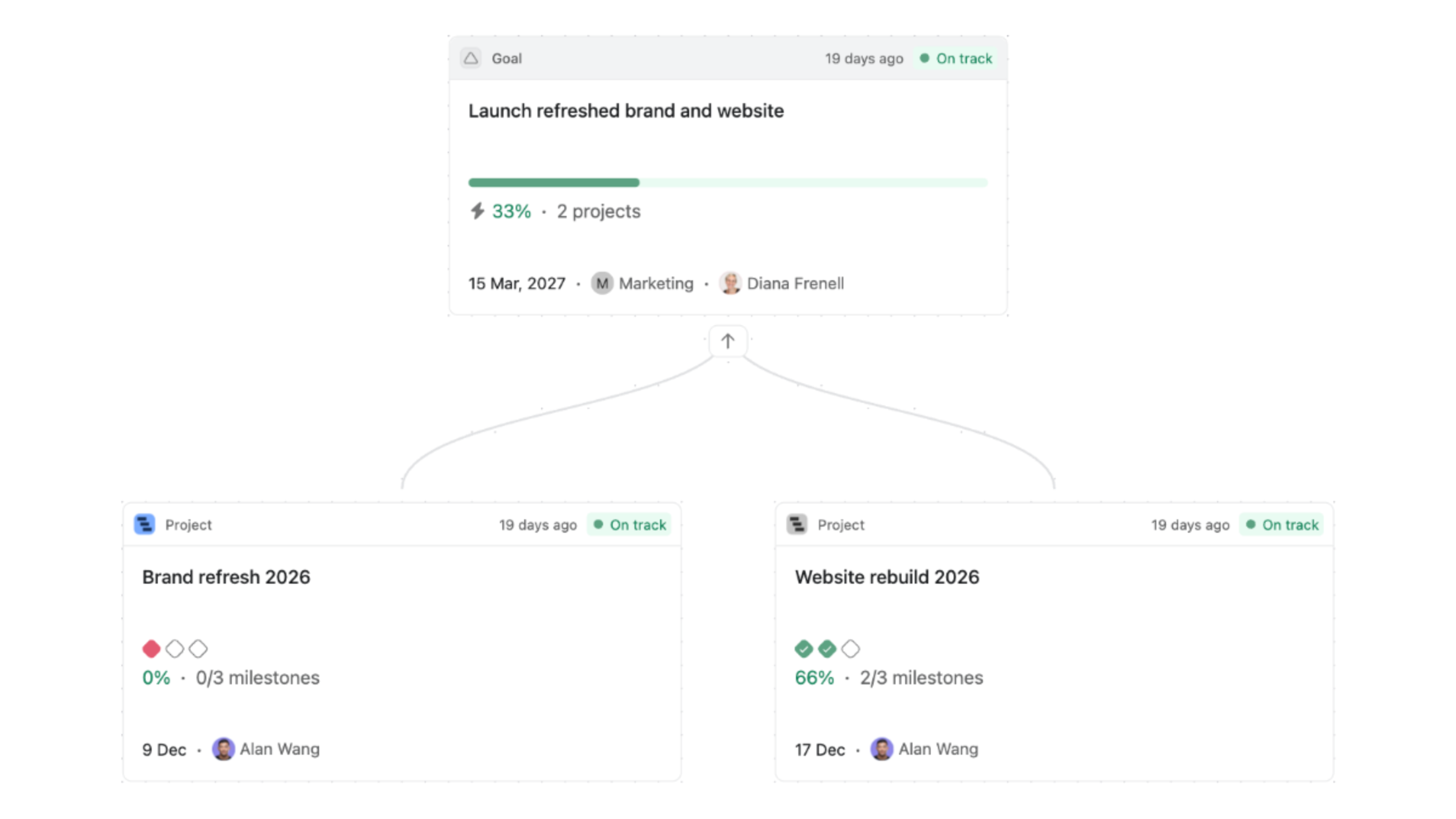
Asana provides Goals alongside the projects and tasks teams use to manage execution. Teams can create a hierarchy of company and team goals, connect measurable sub-goals, and link contributing projects, milestones, or specific tasks. That makes Asana a very strong option for teams whose main challenge is keeping strategy visible in the same system as the work.
| Platform | Approach | Measurement model | Best fit |
|---|---|---|---|
| monday.com | Board-based: objectives as groups, key results as items, initiatives as subitems, monitored with columns, formulas, automations, and dashboards | Whatever you build with columns and formulas | Teams that want a flexible board model and have someone to maintain the structure |
| ClickUp | Dedicated Goals object with Targets | Targets support numbers, currency, task completion, or true/false outcomes | Teams where numeric or financial tracking is central to measurement |
| Asana | Goals alongside the projects and tasks teams use to manage execution, with a hierarchy of company and team goals | Progress from sub-goals, a connected project, specific tasks, or manual updates | Teams whose main challenge is keeping strategy visible in the same system as the work |
So which one should you choose?
There is no universal winner. monday.com may suit a team that wants to build a highly flexible board-based model. ClickUp may be a good option when number or currency Targets are central to measurement. Asana is often the clearest fit when the priority is a visible connection between goals, projects, milestones, and day-to-day tasks.
That is why Cirface often recommends Asana for teams that want goal tracking to sit close to execution. It is a fit-based recommendation, not a claim that one platform is best for every organization. The right choice depends on how your team measures progress, where work already lives, and how much system design and maintenance your team can realistically support.
What are Asana Goals, in practical terms?
Asana Goals give teams a place to define outcomes, assign ownership, set time periods, and connect measurable results to the work supporting them. They are most useful when they become part of planning and review, not when they are treated as a second reporting system.
One of the most important setup decisions is the progress source. Asana Goals can use four sources of progress:
Sub-goals: Progress can roll up from goals that sit underneath a broader goal.
A project: Progress can be based on the completion of all tasks in the project or on the completion of milestones, depending on the setup.
Specific tasks: You can select individual tasks that should contribute to the goal.
Manual progress: The goal owner updates the progress themselves. This option requires a manual update.
| Progress source | How it updates | Best when |
|---|---|---|
| Sub-goals | Rolls up from the goals that sit underneath a broader goal | A parent goal is measured by the goals below it |
| A project | Based on completion of all tasks in the project, or milestones only, depending on the setup | One project's delivery is the outcome |
| Specific tasks | You select the individual tasks that count toward the goal | Progress lives in a defined set of tasks |
| Manual progress | The goal owner updates the progress themselves | The metric lives outside Asana, such as a number or currency figure that needs a manual update or an integration |
Note: a goal uses one configured source. You cannot combine a full project with an individual task from another project in the same progress setup.
These sources are different ways to define what progress means. They are not a guarantee that every task in Asana will update every goal.
For example, a customer onboarding goal might use an onboarding improvement project as its progress source, with progress based on all tasks or only milestones. Alternatively, the team might choose specific tasks assigned to the responsible team members. A customer education milestone could be one of the milestones counted within the project, or it could be tracked as part of a separate goal structure. The important thing is to choose the source that matches the way the team measures the outcome.
When you choose a project as the progress source, you connect the project and choose how its completion should count. When you choose specific tasks, you select the tasks directly. You cannot combine a full project with an individual task from another project in the same progress setup.
A simple setup might look like this:
Company goal: Improve customer retention.
Team key result: Increase successful onboarding completion from the current baseline to the agreed target.
Progress source: An onboarding improvement project measured by its milestones, or a defined set of onboarding tasks.
Review: The goal owner shares progress, context, blockers, and the next decision needed.
The structure is not the strategy. It is the place where the strategy can stay visible while the work changes around it.
Your next step
Before choosing a tool, review the goals your team missed and look for the system failure underneath each one. Was the data scattered? Was the goal too vague? Did the team have a voice in shaping it? Could people see the connection between their tasks and the outcome? Did anyone own the review process?
Fix those conditions first. Then configure the tool around the way your team needs to work.
Setting up goals in Asana is not just a matter of creating them and moving on. It means designing the right structure, choosing meaningful measures, connecting goals to real work, and creating a rhythm the team can maintain. If your team needs support along the way, Cirface can help with the design, Asana setup, and team training that turn a goals system into something people can actually use. The Asana Goals Package outlines what that support can include.
Conclusion
Missing a goal does not always mean the team lacked effort. It may mean the goal was hard to find, hard to measure, shaped without enough team context, disconnected from daily work, or left without an owner and review rhythm.
The fix is not another year-end scramble to rebuild a slide deck. Make the goals visible, give them structure, connect them to the work, and create a simple way for the team to keep them alive throughout the year.
Frequently asked questions
Do we need to use OKRs to use Asana Goals?
No. OKRs are one useful framework, but they are not the only option. Use the framework that helps your team define outcomes, measures, ownership, and review points clearly. Asana Goals can support that structure as long as the goal types, metrics, and contributing work are configured consistently.
Can Asana Goals update automatically from tasks?
They can update automatically when the goal is configured with an automatic progress source. There are four progress sources to choose from: sub-goals; a project, measured by all tasks or by milestones; specific tasks; or manual progress. Manual progress requires the goal owner to update it themselves.
This means that selecting specific tasks can update a goal based on those configured tasks, but completing any task in Asana does not automatically change the goal. If you choose a project as the source, the goal uses the project’s configured completion logic. You cannot combine a full project and an individual task from another project in the same progress setup. Standalone numeric or currency metrics may still need a manual update or an appropriate integration.
How often should we review goal progress?
Choose a cadence that matches the pace and risk of the goal. A weekly review may suit fast-moving work, while a monthly or quarterly review may be enough for longer-term outcomes. Asana can create a task for the goal owner on a weekly, every-two-weeks, monthly, or quarterly cadence to prompt a progress update. The task reminder supports the process, but the team still needs to decide what to discuss and what action to take.
Is Asana better than monday.com or ClickUp for goal tracking?
It depends on what your team needs. monday.com offers a flexible board-based way to model goals. ClickUp provides a dedicated Goals object with Targets that can support number and currency measurements. Asana is often a strong fit when the main problem is the connection between goals, projects, milestones, and tasks. Compare the measurement model, the work connection, and the amount of maintenance your team can support, not just the dashboard design.
Who should own a goal?
Each goal should have one accountable owner, even when several people contribute to it. The owner is responsible for keeping progress current, bringing context to reviews, and asking for decisions or support when the goal is at risk. Shared contribution works best when accountability is still clear.