
If you’re looking for a project management tool, you’ve probably come across Smartsheet and Asana. Both are popular, and they organize work differently.
Smartsheet works like an advanced version of Excel, built around structured data. Compared to that, Asana is built for teams that hand work between people and want rules to move that work forward automatically.
Go with Smartsheet if your work is best managed in grids and formulas that feed structured reports. Choose Asana if work passes between teams and each team needs to see where it stands.
So which one is the better choice for you?
In this post, I'll break down the key differences between Asana and Smartsheet and explain when Asana project management is a better option for highly collaborative teams.
Key Takeaways
Asana is built for marketing and product teams that share work across functions and want automation to handle handoffs.
Smartsheet is best for PMO and finance teams that run their work in spreadsheets and report on structured data.
Both platforms now include AI on paid plans. Asana's AI works at the workflow level, drafting status updates and running rules. Smartsheet's AI works at the data level, writing formulas and building charts.
Asana includes automation in the Starter plan and goal tracking in the Advanced plan. Its newest AI capabilities (AI Studio and AI Teammates) cost extra, as do Smartsheet's advanced modules. The best approach is to add up the seat minimum and the add-ons your team needs before you compare the two prices.
Asana offers better long-term value for growing teams. You start at a 2-seat minimum, and guest collaborators stay free on paid plans.
Table of Content
Asana Vs. Smartsheet Comparison
The difference between Asana and Smartsheet comes down to what each tool treats as the unit of work. Asana organizes work in shared projects, where a task connects across teams and updates in real time. Smartsheet lets you work in sheets that hold each task as a row, with columns carrying the data and formulas doing the calculation.
Asana is built for work that several teams touch. A task links to every project that needs it, and an update made in one project shows in all of them. So instead of fixed grids (in Smartsheet), Asana offers multiple project views (list, board, timeline, calendar, and Gantt) so each team works in the format that fits, on the same underlying data.
Smartsheet is an advanced, cloud-based spreadsheet that enterprises use to run structured. Finance teams and PMO functions pick it when the work depends more on formulas and cross-sheet references.
Asana vs Smartsheet at a glance
Below we're comparing Asana with Smartsheet across the factors that help you make the right choice.
| Comparison Factors | Asana | Smartsheet |
|---|---|---|
| Entry paid plan | Starter: $10.99/user/month annual, $13.49 monthly | Pro: $9/user/month annual, $12 monthly |
| Seat rules | 2-seat minimum | Pro capped at 10 members; Business has a 3-seat minimum |
| Free plan | Free for up to 2 users | 30-day trial for new users |
| Automation actions | Up to 20 actions per rule, 50 rules per project, no monthly cap; AI Studio workflows run on credits instead | 250 automations/month on Pro; unlimited on Business and above |
| Views | List, board, timeline, calendar, Gantt | Grid, Gantt, card, calendar |
| AI availability | Included on paid plans; AI Studio and AI Teammates are paid add-ons | Included on Pro, Business, and Enterprise |
| Free collaborators | Unlimited free guests on paid plans | Unlimited free Viewers and Guests |
| Integrations | 200+, including native Figma and Canva | 175+; Figma and Canva only via Brandfolder, a paid add-on |
1. Ease of Use & User Experience
Here’s how Asana and Smartsheet compare when it comes to usability and UX.
Asana is built around views
Asana gives you multiple project views (list, board, calendar, and timeline) so the tool adapts to how your team already works. There are no formulas to write and no fixed grid to fit your work into.
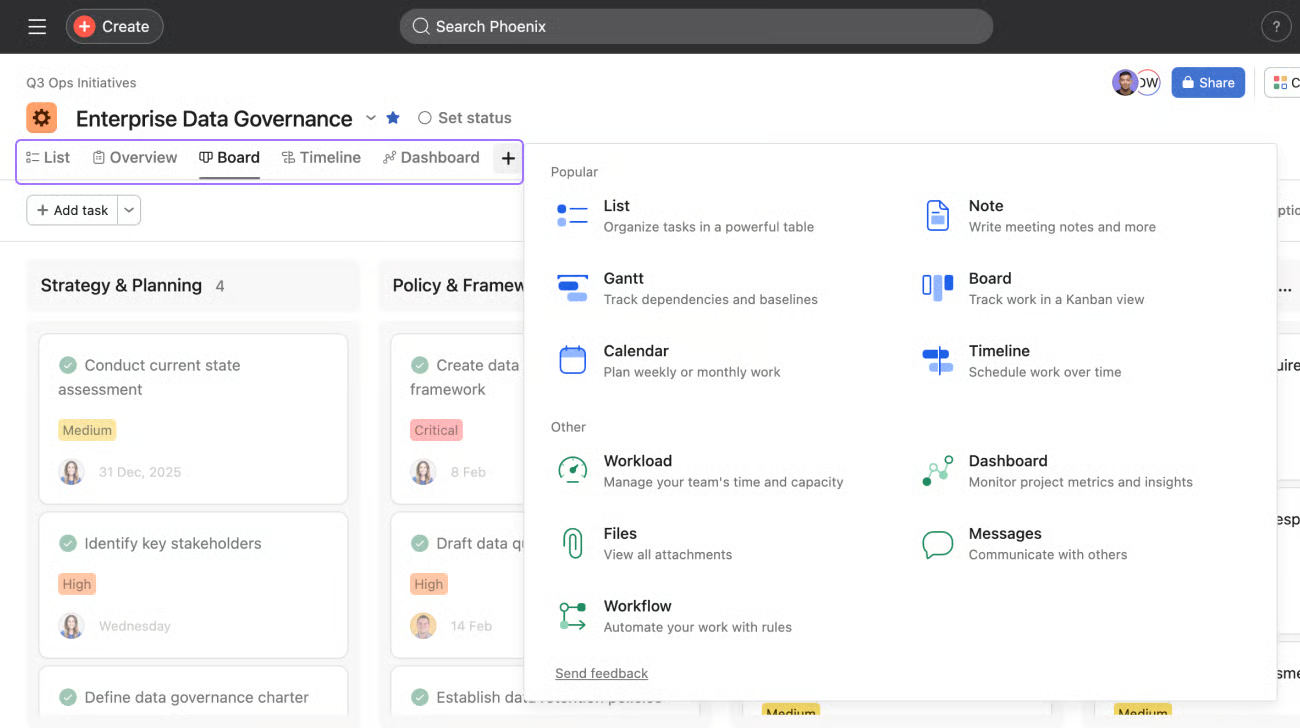
Asana Views
For example, the view menu above lists List, Board, Timeline, Calendar, Gantt, and Workload alongside Dashboard and Files. One project holds all of them at once, so the delivery lead reads the Gantt for dependencies while the same tasks appear as cards on the team's Board.
Smartsheet works like an advanced spreadsheet
If you’re comfortable with Excel, the Smartsheet UI might seem familiar. But that also means every task remains in a grid, and each attribute, from status to priority, becomes a column to configure manually.
Teams comfortable in Excel find the entry point familiar. That familiarity fades as sheets grow. A large sheet depends on multi-step conditional formulas and cross-sheet references, and the businesses our implementation team migrates to Asana for most often cite the formula learning curve and slow load times with large datasets.
Verdict: Asana wins on setup speed. Your team can build a working project without first configuring columns or writing formulas.
2. Collaboration & Teamwork
Asana and Smartsheet both support teamwork, but they differ in how work connects across teams. In Asana, a single task can span multiple projects, whereas Smartsheet lets you keep each task within its sheet.
Asana keeps collaboration on the task
Asana stores assignments, comments, @mentions, and progress updates on the task itself. Every comment and status change is logged in the activity feed, so the history stays on the task instead of scattering across email threads.
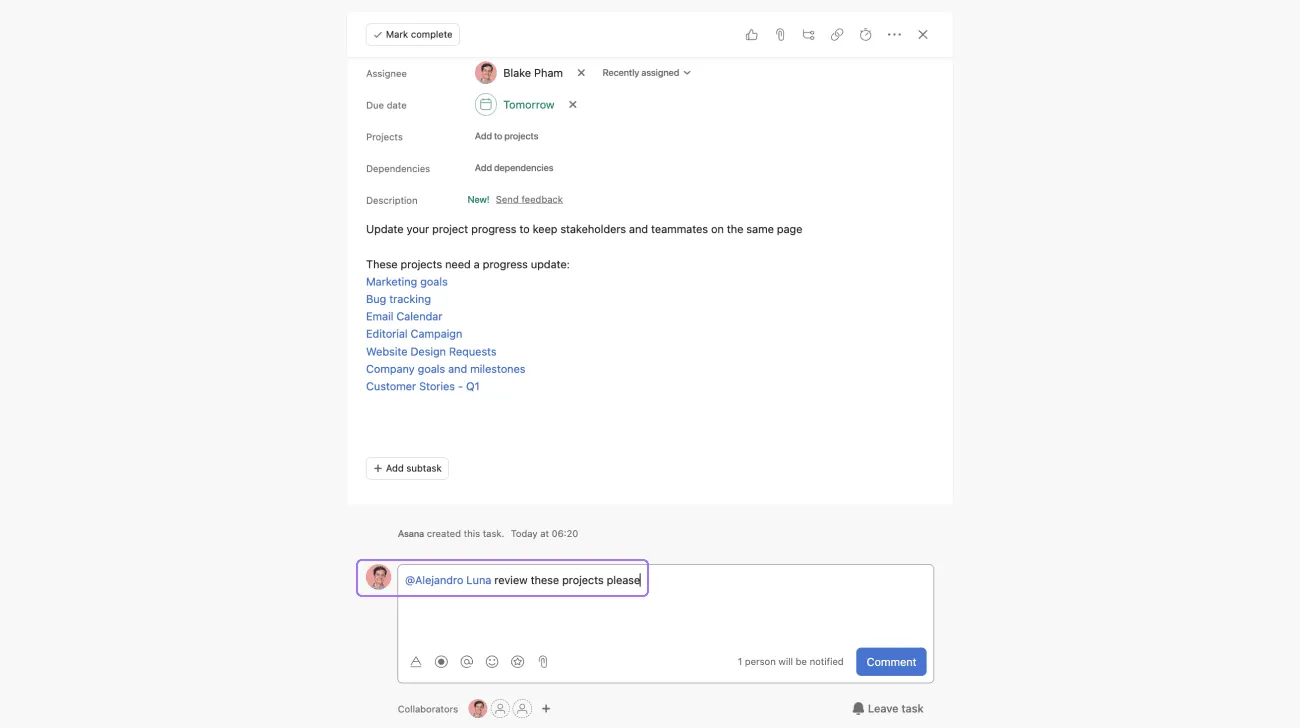
Asana with easy @mentions
You @mention a teammate to bring them in, or @mention another task to connect related work.

Smartsheet keeps collaboration in the sheet
Team members comment at the row level, and dashboards roll up status across sheets for teams that report on a set cadence. A proofing feature lets reviewers approve or request changes on an attached file. This works well when review follows a fixed path.

Collaboration using Smartsheet
Row-level comments stop working when one task belongs to several teams. The row exists in one sheet, and an update to it never reaches the other teams' sheets.
The Asana advantage: Asana’s Multihoming makes a single task visible in multiple projects at once. The same task appears in the campaign project and the events project, and both teams update one record. Smartsheet has no equivalent collaborative feature, which means teams often have to duplicate work or manually track tasks across multiple sheets.
Verdict: Asana wins this one. Multihoming means cross-functional teams see the same task from their own project without anyone maintaining a second copy.
3. Automation & Workflow Efficiency
Asana and Smartsheet both automate routine work, but they differ in how they build rules and how much a single rule can do.
Asana runs multi-step rules
A Rule checks a condition and, when the condition is met, triggers a chain of actions.
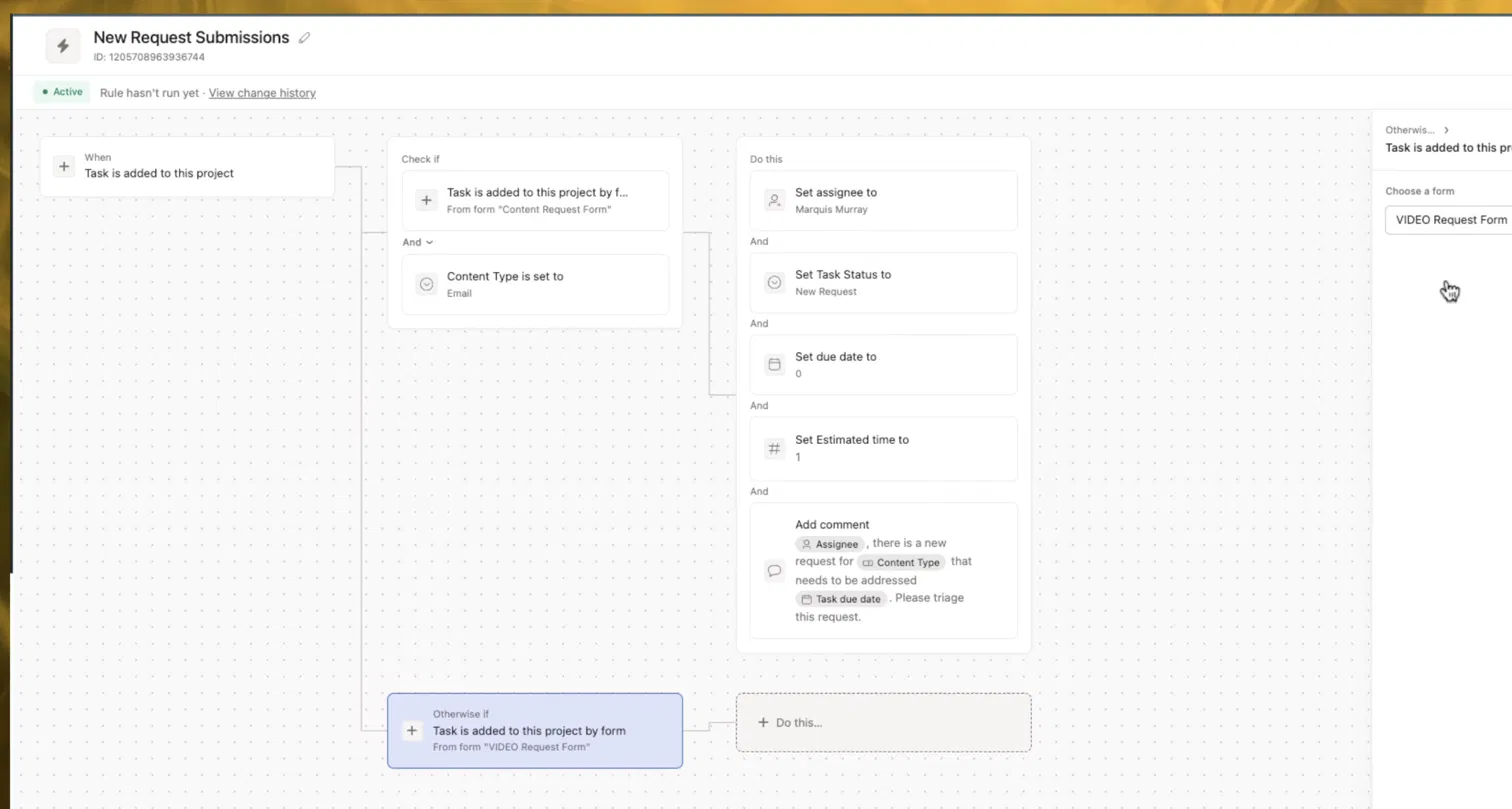
Asana Rules
For example, the above rule sets the assignee, updates the status, due date, and estimated time, and posts a comment. It also branches: a task from the Content Request form follows one path, and a task from the Video Request form follows another.
Rules require a paid plan, and Asana does not cap the number of times they run. There is no monthly action limit and no usage meter under the regular rules, so a rule that fires 200 times in a week costs the same as one that fires twice. Two limits apply to how a rule is built: one project can hold up to 50 rules on any tier, and one custom rule can have up to 20 triggers and 20 actions. Portfolio-level rules start on Advanced, and AI Studio workflows run on credits rather than under these rules.
Smartsheet builds automation from a trigger on the sheet
Automation in Smartsheet starts with a trigger such as adding a new row, changing it, or reaching a certain date. It lets you add conditions to filter which rows qualify, and then choose actions.
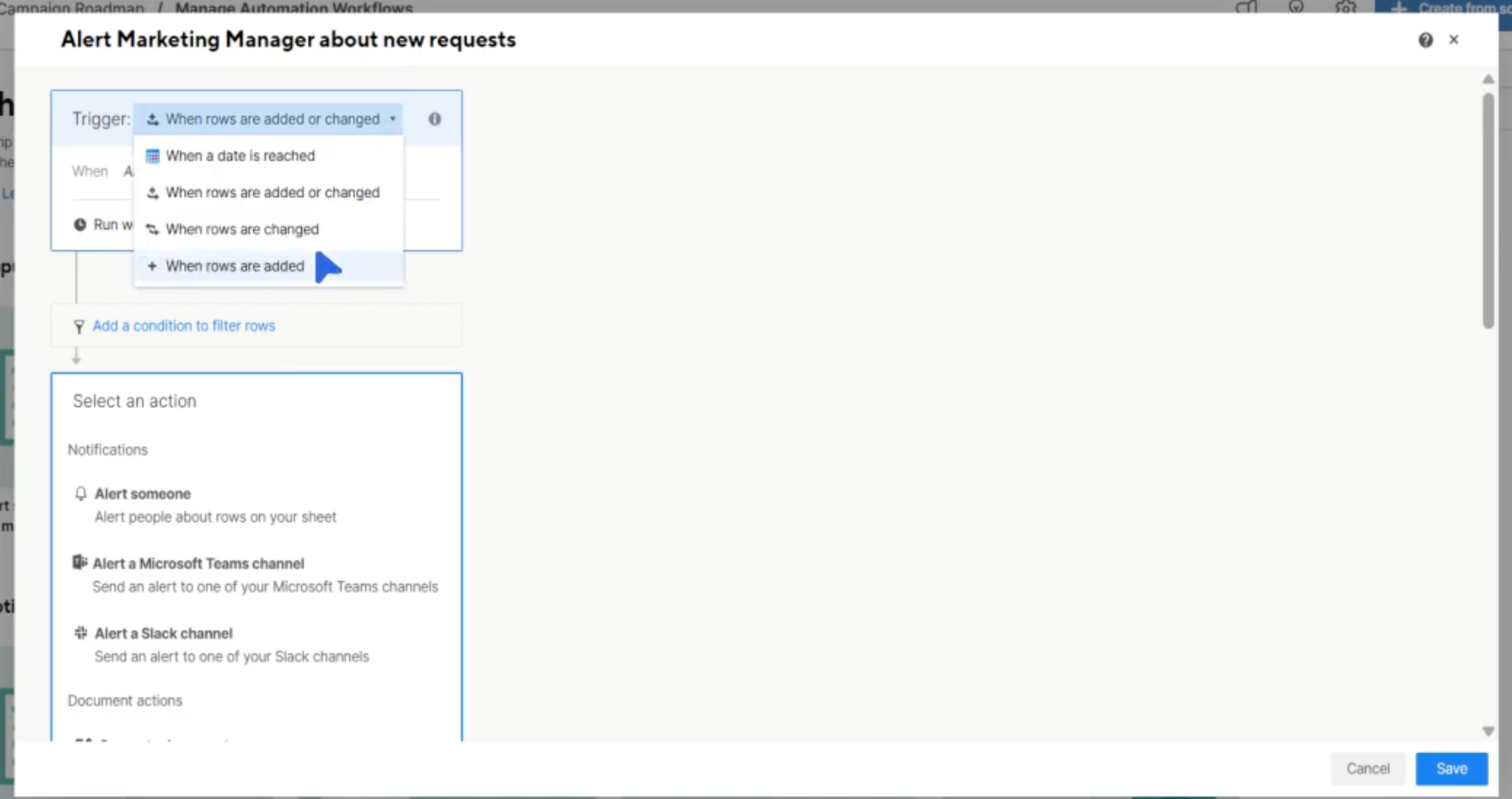
Automation in Smartsheet
Smartsheet groups those actions into four categories:
Notifications and reminders
Sheet changes
Update and approval requests
Document generation
Every rule stays bound to the sheet it was built on. When a marketing request needs the creative team, the rule can set Status to "Creative Review" and alert them, but the row stays in the marketing sheet. The creative team either works inside that sheet or copies the row into theirs, and the two copies cease to match. An Asana rule adds the same task to the creative team's project, so both teams update one record.
Verdict: Asana wins this one. Smartsheet rule updates the row where it exists, while an Asana rule can route the task itself to the next team.
4. Reporting & Goal Management
Let’s take a closer look at reporting and goal management to compare how Smartsheet and Asana approach them.
Asana Goals shows live rollup from linked projects
Asana dashboards pull straight from your projects, tasks, and goals, so widgets update without a separate data model to maintain.
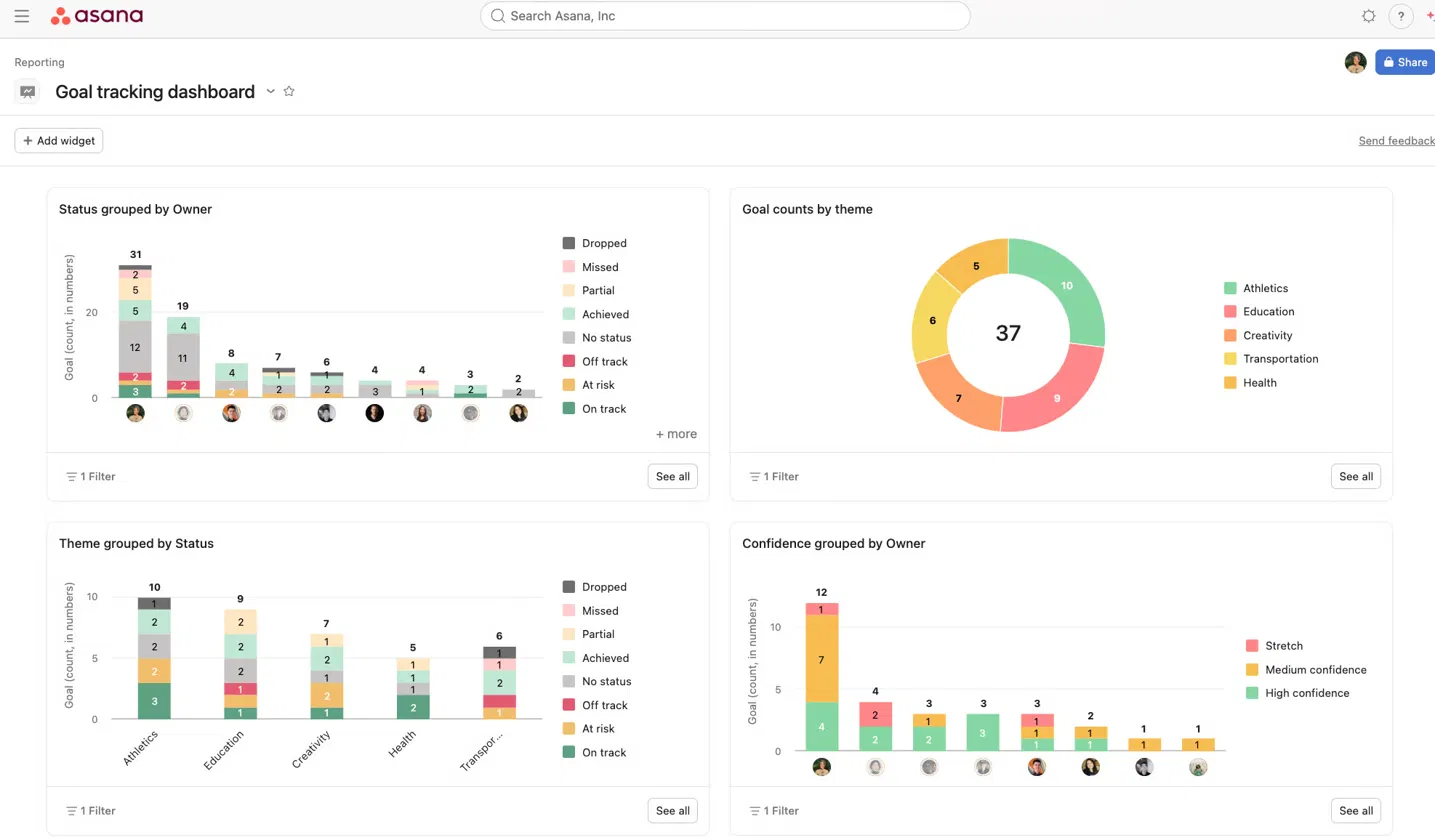
Goal tracking dashboard in Asana
Status updates can be AI-drafted from that same data, so you review and send instead of writing one from scratch.
Asana treats a goal as a native object that links to projects directly. You link a goal to the projects that feed it (Asana also ships ready-made goal templates), and progress rolls up automatically as tasks or milestones in the linked projects close. A Strategy Map then shows how individual or team goals connect to company objectives.
Smartsheet puts cross-sheet data into charts and summary widgets
Smartsheet reports pull rows from multiple sheets into a single view and give you customizable reporting that pulls data to give an information-rich view of your projects. Reports update in real time and support grouping and summary functions. You can also roll several projects into a portfolio-level report, which suits PMO teams that report across many projects on a set schedule.
When it comes to goal management, Smartsheet is more limited because there’s no built-in Goals feature. But you can track an objective by building a goal-tracking sheet yourself, which is why Smartsheet publishes ready-made templates to start from.
Verdict: I'll have to give this one to Asana. Asana treats goals as a built-in feature that updates on its own. Smartsheet's reporting is strong, but goal tracking requires building and maintaining your own sheet.
5. Pricing
The table featured earlier in this blog covers the headline rates, but what changes your bill is what remains outside the plan.
Smartsheet keeps resource management and the Jira and Salesforce connectors as paid add-ons, so the quoted per-user price rarely matches what you spend. Business also carries a 3-seat minimum, which puts the real entry point near $57 per month.
What works in Smartsheet's favor is that the viewers and commenters use free seats on paid plans and external guests are free on Business and up. Additionally, if most of your team only needs read-only access, Smartsheet costs less to run.
Asana keeps core work management inside the tiers. Timeline, dashboards, and automation come with the plan, and guests are free. Advanced AI (AI Studio, AI Teammates) and Timesheets are separate purchases, the same way Smartsheet charges for its advanced modules.
For plan-by-plan detail, see our guide to Asana pricing.
Verdict: Smartsheet costs less when most of your team only reads or comments. Asana makes billing more predictable once you’re set with automation, goals, and reporting, because all three come with the Advanced plan instead of being priced separately.

Who Should Use What?
Pick Smartsheet when the work has to remain inside one team and gets reported upward. Pick Asana when the same piece of work passes through several teams before it is finished.
Smartsheet fits structured, data-heavy workflows
Smartsheet is suitable for businesses where the record itself is the deliverable and reporting matters more than the handoff.
✅ Finance and accounting: Budget and forecast tracking use cases where formulas calculate the numbers and the cell history serves as the audit trail.
✅ Operations and logistics: Resource allocation, where the team needs to see hundreds of rows at once and sort them.
✅ PMO: Portfolio rollups and risk registers built on a fixed template every project must follow.
✅ IT and engineering: Implementation trackers where each row carries structured attributes rather than a conversation.
The exception is an item that belongs to several teams. The row appears in one sheet, and the second team either works inside that sheet or keeps a copy that stops matching.
Asana fits work that moves between teams
It makes sense for your business to use Asana if a single piece of work passes through several functions before it is finished. Some of the use cases are:
✅ Marketing and creative: When campaign deliverables move through brief, design, review, then launch.
✅ Product and engineering: Features that appear in both the product roadmap and the engineering sprint at the same time.
✅ HR and people ops: Onboarding checklists that run for every new hire and roll up to a department goal.
✅ Customer success and sales: Includes account onboarding, where implementation and the account owner update one record.
Final Verdict: Asana vs Smartsheet
Smartsheet is the stronger tool when one team owns the work and reports on it. You get formulas and cross-sheet references inside a structure that finance and PMO functions already know how to run.
Asana is the stronger tool when several functions handle the same piece of work before it is finished. Multihoming puts one task in every project that needs it, and automation moves that task to the next team as the work progresses.
Businesses that switch to Asana move projects that have outgrown the grid to Asana, while keeping the spreadsheets where formulas still work.
If you are weighing the move, book a consultation, and we will map your current sheets against Asana's structure before anything changes.
Frequently Asked Questions
These are some of the questions teams ask us most often when comparing the two platforms.
Can I use Asana and Smartsheet together?
Yes. Keep Smartsheet for budget models and data tables, run delivery in Asana, and connect the two through Zapier or their APIs. For two-way sync that keeps both records updated, a dedicated tool like Unito maps fields in both directions. Decide which system owns each field first, or they will overwrite each other.
Does Asana have a spreadsheet view like Smartsheet?
Asana's List view shows tasks in rows with fields as columns, so it looks similar. Asana fields hold values, while Smartsheet cells hold formulas. If your work needs calculations across rows, List view will not replace a sheet.
What happens to my Smartsheet formulas if I move to Asana?
Asana has formula custom fields on Advanced and Enterprise plans, so calculations built on number and date fields carry across. Add, subtract, multiply, divide, and a Rollup function that sums subtask values are all available. What does not carry across is anything referencing another row or another sheet, since Asana formulas only read fields on the same task. Those calculations stay in a connected spreadsheet.
Can external clients or contractors use Asana without a paid seat?
Yes. Anyone with an email domain outside your organization joins Asana as a guest. Guests are free and unlimited on paid plans but share the 2-user limit on a free plan. A guest can be assigned tasks and comment inside the projects you share with them. Smartsheet offers free Viewers, plus free Guests on Business and above.
