
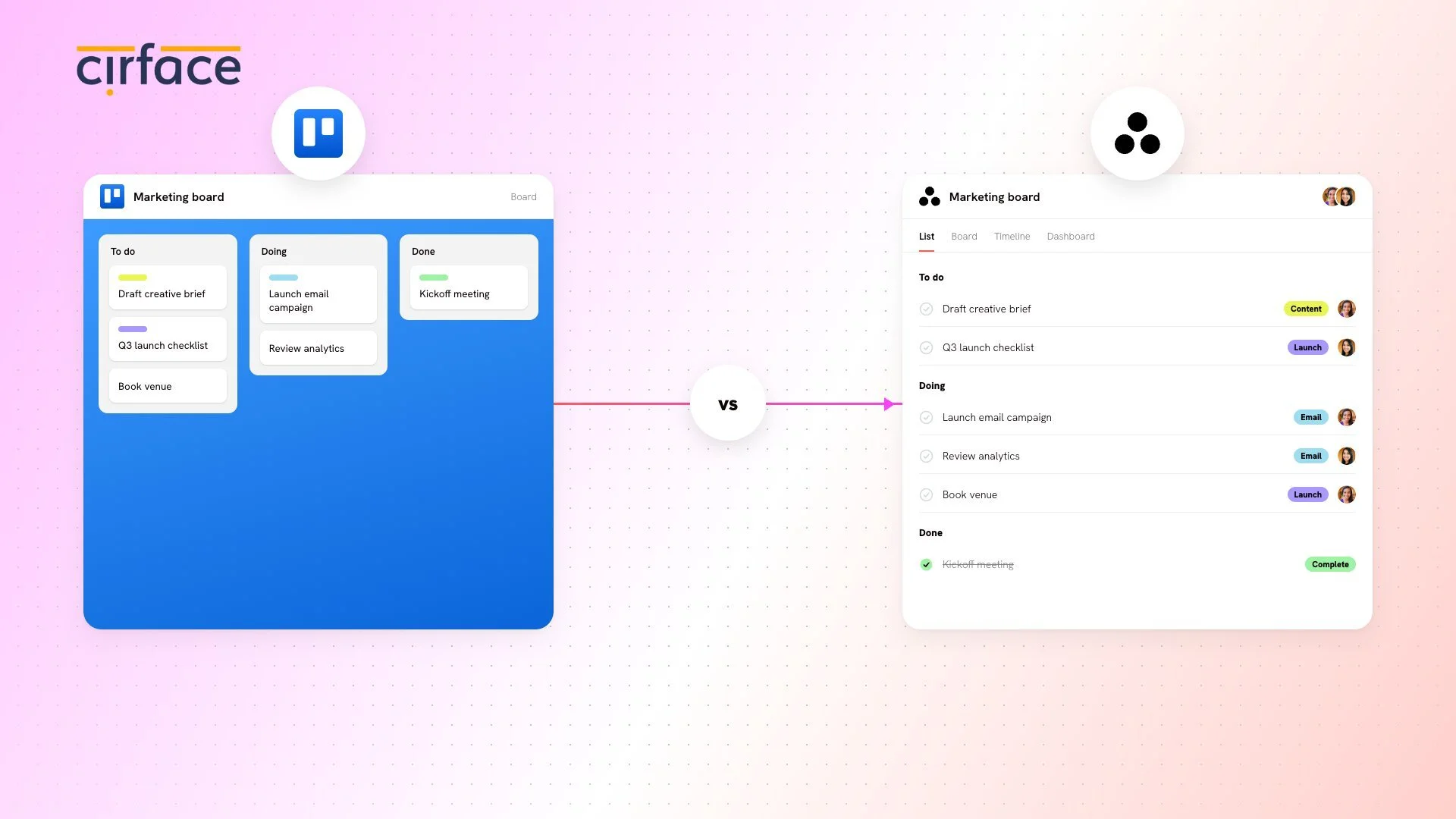
If your team has been running on Trello for a while, there is probably a good reason. Trello is clean, visual, and easy to pick up. For plenty of teams, that simplicity is exactly what makes it work. But at some point, the work itself gets more complex. More people, more handoffs, more reporting needs. And the tool that used to feel effortless starts to feel a bit limited.
That is usually the moment teams start looking at Asana.
Both tools are good at what they were built for. The real question is not which app looks nicer or has more features on paper. It is which one fits the way your team actually works right now, and where that work is headed.
Should you move from Trello to Asana?
Move when your work has outgrown a single board: once you need task dependencies, multiple views, cross-team reporting, or a system that scales past simple lists, Asana is usually the better fit, and a CSV import, Unito sync, or done-for-you migration can get you there without losing your history.

What Trello is and where it shines
Trello is a visual project management tool built around boards, lists, and cards. It is simple, flexible, and easy to understand quickly. That is a big part of why so many teams use it for lightweight project tracking, content planning, and personal task management.
If your workflow is mostly linear and your team benefits from a clear visual overview of work in progress, Trello can be a very good fit. It keeps setup light and the learning curve low.
Trello also offers Power-Ups (third-party plugins that extend functionality) and Butler automations to customize workflows. With the right setup, teams can add time tracking, calendar views, approval flows, and more. The trade-off is that building those integrations takes time and expertise, and the more you layer on, the further you move from Trello's core simplicity.
What is Asana, and why teams often move there
Asana is built for work that has more moving parts. Instead of stopping at a board, it gives teams ways to organize projects at multiple levels, assign clear ownership, track dependencies, and see how work is progressing across the organization.
At the core of how Asana works is the Work Graph, which connects work across teams instead of trapping it in isolated projects or folders. It gives teams a layered structure where tasks, projects, portfolios, and goals relate to each other, so work stays visible in the right places without constant manual updating.
This means a single piece of work can be tracked at the task level by the person doing it, at the project level by the manager, and at the portfolio or goal level by leadership, all without duplicating effort.
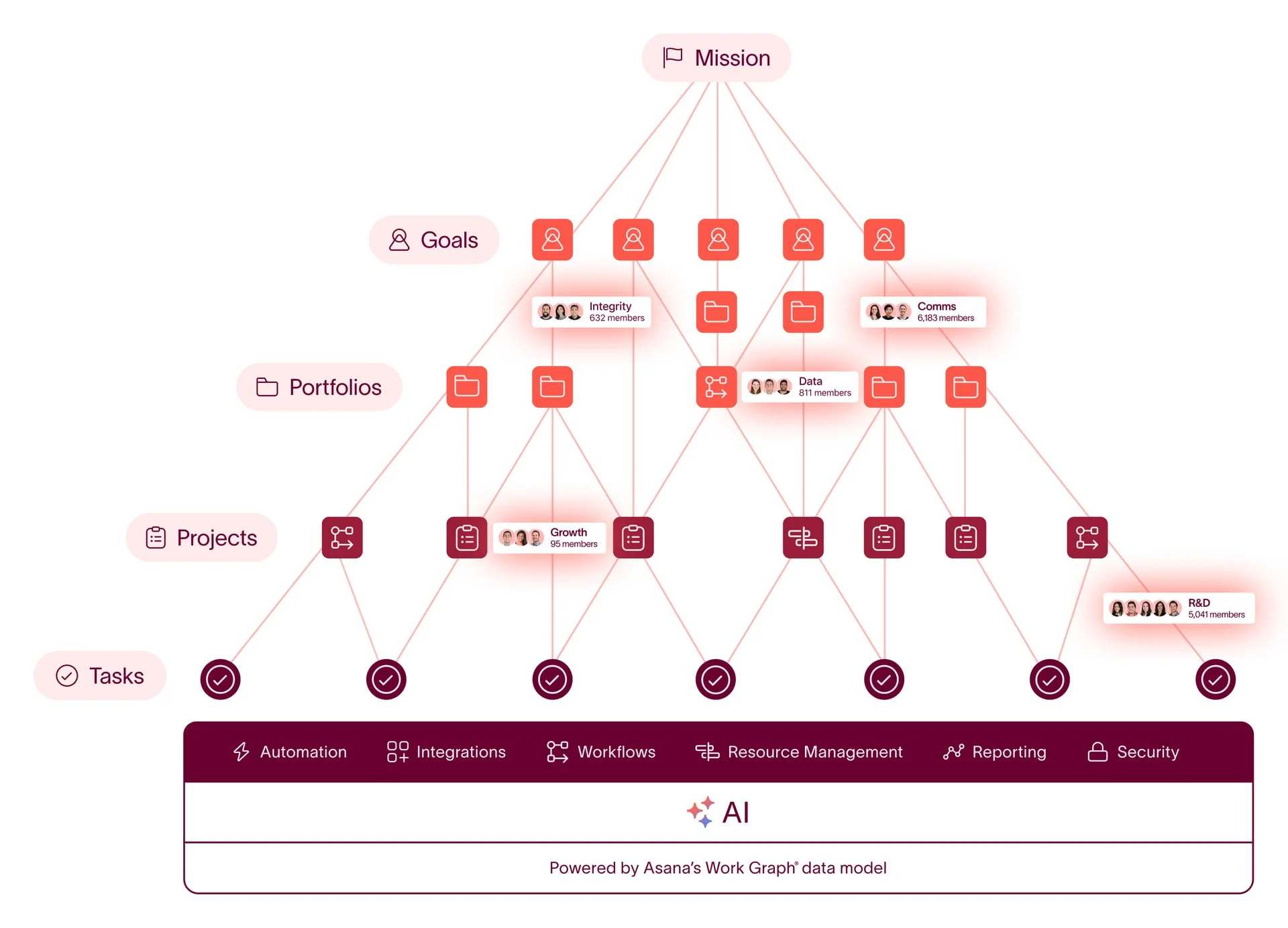
That matters when a project is not just "to do, doing, done." It matters when one task blocks another, when leadership wants reporting, when multiple teams need visibility, or when you need a cleaner way to manage ongoing work across the business.
A marketing team might be perfectly happy in Trello for a basic content calendar. But an operations team coordinating launch work across design, product, and customer support usually needs more structure. Asana gives that structure without making the work harder to follow.
Where Asana pulls ahead, and why it matters
The biggest reason teams move to Asana is not that Trello is missing something obvious. It is that Asana handles complexity better without requiring a patchwork of plugins and workarounds.
Here is how that plays out in practice:
Task ownership and accountability. Every task in Asana has a single owner. That sounds small, but it eliminates the "I thought someone else was handling it" problem. In Trello, cards can have multiple members, which is flexible but sometimes makes it unclear who is actually responsible.
Native dependencies. Asana lets you mark tasks as "waiting on" other tasks, so teams can see what is blocked and plan accordingly. Trello does not offer this natively. You can get partway there with Power-Ups, but it is not the same as having it built into the core of how work flows.
Multiple views of the same project. Both Trello and Asana offer different ways to view work, including boards, calendars, timelines, and tables. The difference is how they work in practice. In Asana, every project can be viewed as a list, board, calendar, timeline, or Gantt chart, and team members can switch between them freely or work in different views simultaneously on the same project. Trello has added similar views over time, but switching between them replaces what you see rather than offering independent, fully integrated alternatives. In Asana, each view is a first-class way to interact with your work.
Reporting and visibility. Asana's reporting is especially powerful because it operates at multiple levels: project-level dashboards, portfolio-level ones, and universal reporting that can pull data across the entire organization. Paired with a well-built library of custom fields, Asana lets teams generate detailed, meaningful reports without extra manual work. For teams that need to report up or across departments, this depth of reporting often becomes the tipping point
Scalable workflows. Asana's rules, forms, and project templates let teams build repeatable processes that grow with the organization. Trello's Butler automations cover some of this ground, but Asana's workflow engine tends to hold up better as complexity increases.
AI and automation. Both Trello and Asana have introduced AI features, but Asana has gone further. Beyond its AI chat assistant, Asana offers AI Studio, which lets teams add large language models directly into the rule engine for dynamic, context-aware automations. Asana also has AI Teammates: agents that can support and execute work based on your team's guidelines, not just surface suggestions. For teams looking to reduce manual overhead without losing control, Asana's AI capabilities are meaningfully ahead.
Trello can absolutely support teamwork, and it does so well for the right use cases. But when a team needs more than a single-level board, Asana usually becomes a more natural home because many of these capabilities come built in rather than bolted on.
Trello vs Asana at a glance
| Capability | Trello | Asana |
|---|---|---|
| Core structure | Boards, lists, cards (single level) | Work Graph: tasks, projects, portfolios, goals (multi-level) |
| Task ownership | Multiple members per card | One clear owner per task |
| Dependencies | Not native (Power-Ups) | Built-in "waiting on" |
| Views | Switching replaces the current view | List, board, calendar, timeline, Gantt, all first-class |
| Reporting | Limited, add-on based | Project, portfolio, and universal reporting with custom fields |
| Automation | Butler | Rules, forms, templates that scale |
| AI | AI features | AI chat, AI Studio (LLMs in rules), AI Teammates |
| Best for | Simple, visual, linear work | Complex, cross-functional, multi-team work |
Three ways to migrate from Trello to Asana
There is more than one way to make the move. The right option depends on how much data you have, how messy the structure is, and whether you need to keep both tools running for a while.
1. Export a CSV from Trello and import it into Asana
This is the simplest option, and it is a good fit for a small, clean board.
You can export a CSV from Trello (available on Trello Premium and Enterprise workspaces through the board menu, or with a browser extension like Export for Trello if you're on the Free or Standard plan) and then use Asana's CSV importer to upload it.
The importer maps columns like task name, assignee, due date, and basic custom fields into Asana.
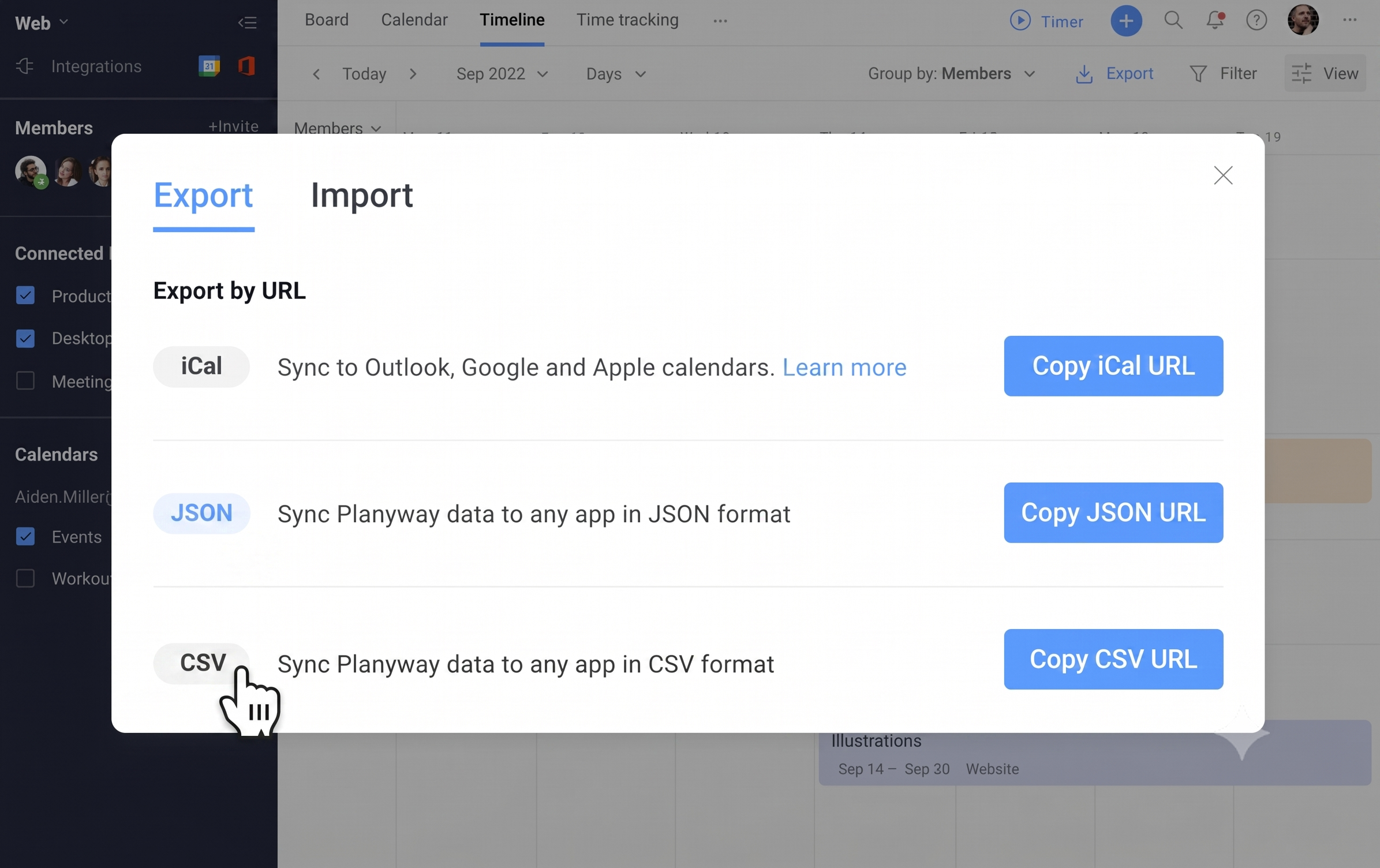
It is not ideal if your board contains a lot of context. Manual CSV imports tend to leave behind the parts people actually rely on, like comments, attachments, subtasks, and dependencies. In other words, it gets the shell across, but not always the whole story.
Use this option if:
you have a small board
your workflow is simple
you can live with some cleanup after the import
2. Use Unito to sync Trello and Asana
Unito is a great option if you want Trello and Asana to keep talking to each other during the transition.

Asana's Unito integration turns Trello cards into Asana tasks and back with real-time two-way sync, without code. That makes it useful when a team is moving gradually, or when one group is staying in Trello for a while and another is already working in Asana.
This is not a full migration in the traditional sense. It is more of a bridge. A very useful bridge, but still a bridge.
Use this option if:
both tools need to stay active for a while
you want live sync during the transition
you are not trying to rebuild a complex historical archive
3. Use our migration service
This is the strongest option when the move is bigger than a simple export.
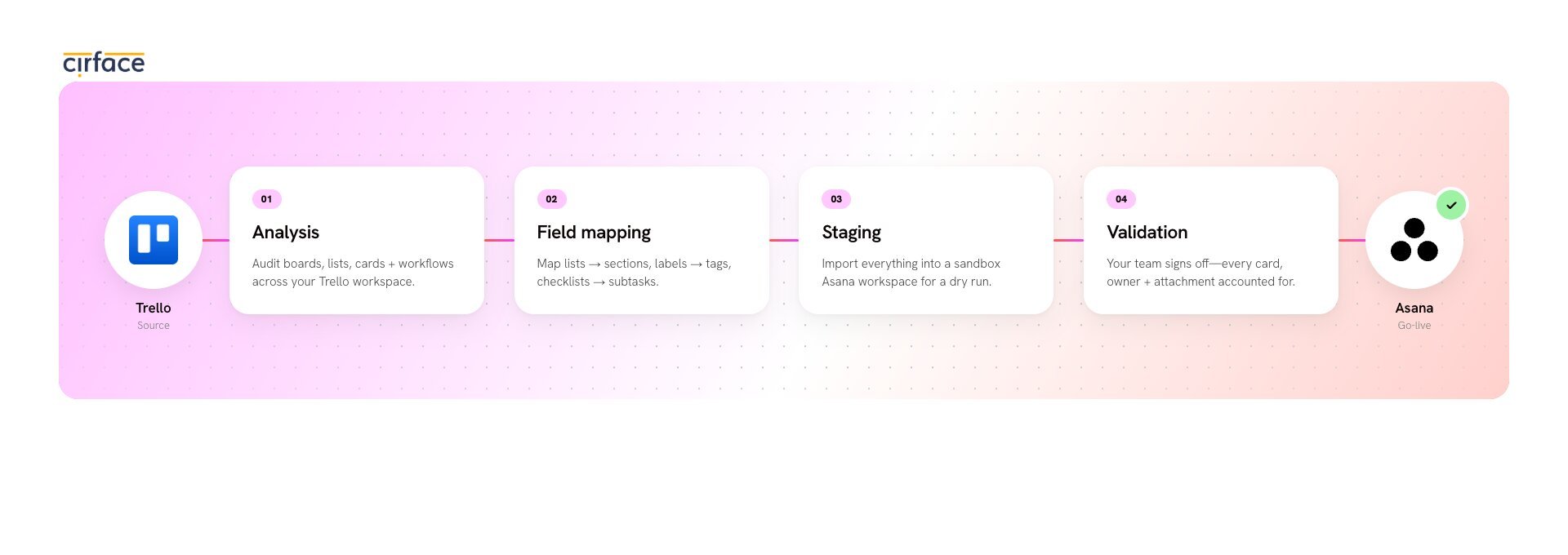
Our migration service is designed to move the parts that manual imports often miss: tasks, subtasks, comments, attachments, custom fields, people, sections, dates, and source IDs.
Just as important, it stages the work inside Asana before it goes live, so your team can validate the structure before anything reaches day-to-day work.
That is a big deal. Migration is not just about copying data. It is about translating the way your team works.
We also do the hard thinking around what should move and how it should be structured in Asana. For example, a Trello board that has grown organically for a couple of years usually comes with duplicate or near-duplicate custom fields scattered across cards. Rather than recreating every one of those as its own project-level field in Asana, our process identifies which fields are actually the same data wearing different names, consolidates them into a small set of shared library fields, and builds your projects on top of that clean foundation. That is the difference between an Asana that looks like Trello with more steps, and an Asana that is actually set up to report on.
Our migration service is a good fit if:
your Trello setup has a lot of history
comments, attachments, and custom fields matter
you want Asana to be clean, not cluttered
you need validation before go-live
you do not want your team spending weeks on cleanup
We use an analysis and mapping process before the migration runs, which helps scope the work based on real item volume instead of guesswork.
That is usually the difference between a smooth move and a very expensive game of "where did that task go?"
If your migration is bigger than a one-board export, get in touch and we can help you figure it out.
Which migration path should you choose?
Short answer: use CSV import for a small, simple board, Unito if you need Trello and Asana running side by side during the transition, and a done-for-you migration when your setup has years of history, custom fields, or structure worth preserving.
Here is the short version.
CSV import if your Trello board is small and simple.
Unito if you need both tools running at once with real-time sync.
Our migration service if you want the migration handled properly, with structure, validation, and less cleanup.
Here is how the three paths compare side by side:
| Path | Best for | Keeps | Effort |
|---|---|---|---|
| CSV import | Small, simple boards | Task names, assignees, dates, basic fields | Low, plus cleanup |
| Unito sync | Running both tools during transition | Live two-way sync of cards and tasks | Low, ongoing |
| Cirface migration | History-heavy, complex setups | Tasks, subtasks, comments, attachments, fields, structure | Done for you |
The right choice usually comes down to how much context you need to carry over. If your Trello setup is a few clean boards with minimal history, a CSV export will get the job done. But if you are dealing with years of comments, attachments, custom field logic, and workflows that need to be rethought for Asana, the effort of doing it manually tends to snowball fast. In those cases, having someone who has done this before handle the mapping, structure, and validation saves more time than it costs. If you are not sure where your situation falls, reach out and we can help you figure it out.
After the move, do not skip the setup work
A migration is not finished when the data lands in Asana. That is just the first half.
The second half is making sure the new setup actually works for the team. That means checking field structure, making sure people understand where work lives, and deciding how the new system should run day to day.
I often see teams put enormous effort into moving data and then underinvest in the part that actually determines whether people use the new tool well. Things like naming conventions for projects and tasks, reusable project templates for recurring work, clear expectations around task assignment and due dates, and a well-thought-out custom field structure that makes reporting possible without extra work. Those details are what turn a migration from "we switched tools" into "we upgraded how we work."

Final thought
Moving from Trello to Asana is less about replacing a board and more about upgrading how your team manages work.
If Trello is still doing the job, there is no rush to move. But if your team has outgrown what a board can handle and needs a system that scales with more complex, cross-functional work, Asana is usually the stronger next step.
When you are ready to make the move, we are here to help, whether that means migrating your data, training your team, or optimizing your workflows so Asana works the way your team actually needs it to.
For more practical Asana advice, sign up for our newsletter.
FAQ
What is Trello mainly used for?
Trello is mainly used for visual task management, simple project tracking, and lightweight collaboration using boards, lists, and cards. It works well for teams with straightforward workflows and can be extended with Power-Ups and Butler automations, though that adds complexity.
What is Asana mainly used for?
Asana is built for managing more complex projects, cross-functional work, dependencies, and team workflows. Its layered structure, known as the Work Graph (tasks, projects, portfolios, goals), lets organizations track work at every level, from individual to-dos to company-wide objectives.
Can I move from Trello to Asana with a CSV export?
Yes. Asana's CSV importer can bring in data exported from Trello, but it works best for smaller, simpler projects. It typically does not preserve comments, attachments, or subtasks, so expect some cleanup afterward.
When should I use Unito instead of a full migration?
Use Unito when you need Trello and Asana to stay in sync during the transition, or when both tools will keep running for a while. It is a bridge, not a one-time migration tool.
When is a custom migration worth it?
If you have a small, simple Trello board with minimal history, a CSV export is usually fine. But once you are dealing with multiple boards, years of comments and attachments, or workflows that need to be restructured for Asana, doing it manually tends to cost more time than it saves. A custom migration is worth it when the context matters as much as the data, when you need the new setup validated before people start working in it, and when you want someone who has done this before to handle the mapping and structure decisions. That is usually the point where a service like ours pays for itself.