
7 lessons on AI agents from Asana's AI product lead
Short answer: Spencer Herrick, Asana's AI product lead, says AI agents pay off when they own whole jobs and draw on a well-kept source of truth. Start with work that has clear inputs and outputs, such as intake, status monitoring and tasks you repeat often. Keep agents accurate with written skills and a second agent that checks their work. Govern them like people, with scoped access, admin controls and a record of what they do.

Spencer Herrick leads AI product at Asana, where his team builds AI Teammates and Asana's AI-first products. His path there started in a windowless room under the Large Hadron Collider in Switzerland, where he monitored the machines as an experimental physicist. He went on to build AI products at Uber, Postmates and Grammarly before joining Asana.
Our founder, Marquis Murray, interviewed Spencer at Asanathon 2026, our Agentic Work in Action summit. They covered why Asana built its platform around agents, where agents still fail and how to govern them.
Below are seven lessons from that conversation, in Spencer's words where it matters. Each one ends with something you can try with your own team.
AI agent best practices at a glance
All seven lessons point the same way: agents do their best work inside a clear, well-run system.
| Lesson | What Spencer said | Try this week |
|---|---|---|
| 1. Bolt-on AI speeds you up, but context changes the work | Asana's early AI features made people faster without shipping projects faster | List where your team's source of truth lives |
| 2. Give an agent the whole job, not one step | The value shows up when one agent runs the whole process | Map one process from intake to sign-off |
| 3. Redesign the workflow before you automate it | You can't drop AI into a workflow and expect the world to change overnight | Sketch the AI-native version of one workflow |
| 4. Automate what you could explain to an intern | If you can't describe the process, an agent can't run it | Write the job description before you build |
| 5. Keep agents accurate | Pair a gold-standard source of truth with skills and an audit agent | Name an owner for each source of truth |
| 6. Govern AI agents like people | AI Teammates get the same scoped access, admin controls and audit trail as people | List what each agent can see before launch |
| 7. Hand agents the continuous work | Some work about work is just work, and agents can carry it all year | Find one year-end fire drill to hand off |
1. Bolt-on AI speeds you up, but context changes the work
Adding AI to an existing tool rarely changes how work gets done. Spencer calls this pattern sidecar AI, where a successful product gets an AI feature slotted in. He was candid that Asana did it too, with smart summaries and smart status.
People like those features, he said. Still, "it might make somebody 10% faster, but it's not shipping a project faster."
What changed Asana's approach was the work graph, its model for keeping tasks, projects and goals in one connected source of truth. Spencer said that turned out to be "exactly what agents need to be successful." Context is what separates a listless agent from one that transforms your work.
In his words, the work graph is "the productivity layer that makes agents go from a novelty to an actual team member." That realization led to Agentic Work Management, which now includes more than 30 prebuilt AI Teammates that run on the work graph.
Try this week. List where your team's source of truth actually lives today. If it's spread across inboxes, chats and spreadsheets, fix that before you hand work to an agent.
2. Give an agent the whole job, not one step
Agents earn their keep when they run a whole process instead of a single step inside it. Spencer used a campaign as his example. Writing the brief is one step, but the real job runs from intake to the brief, through approvals and on to the final stages.
A tool that pushes work along helps, and so does one that writes copy. "When you package that all up into a single agent that's doing that entire job, that in my mind is where the magic really happens," he said.
He pointed to the Launch Coordinator AI Teammate, which Asana describes building go/no-go checklists and acting on comments in shared docs. Spencer said it showed a strong adoption signal with early users, because owning the process from step to step is where people get time back.
He also pointed to two Asana customers that work this way. Indeed reports $300,000 a year in time savings and unlocked capacity from an AI-powered creative operations engine. Morningstar says its AI-powered research content pipeline saves nearly 15,000 hours a year.
Try this week. Map one recurring process from intake to sign-off, and mark the steps an agent could own end to end.
3. Redesign the workflow before you automate it
AI pays off when you change how the work flows, not when you drop it into the process you already have. Spencer called this one of the joys and frustrations of working with AI. It's a very powerful tool, but "you can't just expect to drop it in a workflow and the world to change overnight."
Most people point a new tool at their most immediate problem, which tends to be small, and call that a win. The bigger value comes from going back to the foundations. Look at how work moves through your workspace, then rebuild that flow as an AI-native version where people and agents work together.
Spencer calls this getting into redesign mode, and it's when he sees the big benefits. Asana has built that push into the product. Dropping an AI Teammate into a project where you already coordinate work forces you to define its role in the larger picture.
AI Studio, which Spencer called "truly a workflow builder tool," makes you work out the intake, the classification step and each next step before anything runs. We cover the design side in more depth in our guide to agentic workflows.
Try this week. Pick one workflow and sketch its AI-native version on a whiteboard before you build anything in Asana.
4. Automate what you could explain to an intern
Agents are only as good as the instructions and examples you give them, so start with work you can describe clearly. Spencer pushed back on the idea that AI is magic. Agents do best with "a clear definition of done," "clear examples of what good looks like" and a scaled, structured process.
They struggle when the criteria for judging their work are fuzzy or undefined. His test is simple. Imagine you're hiring an intern for the task, and if you couldn't explain what they'd do and how they'd fit into your workflow, "that's going to be kind of hard for an agent as well."
| Work | Fit for an agent today | Why |
|---|---|---|
| Intake and triage | Good | Clear inputs and outputs |
| Status monitoring | Good | The same checks run on a schedule |
| High-volume repeat actions | Good | Many runs at a consistent rate |
| Work judged on fuzzy criteria | Wait | Nobody can say what done looks like |
| A process nobody has written down | Wait | An agent can't follow what people can't describe |
Spencer named intake, status monitoring and "scaled actions that you want to perform many times at a consistent rate" as really good AI use cases. You can grow into more complex work from there, but he said a clear-eyed, back-to-basics approach is where agents return the most ROI.
Try this week. Write a one-paragraph job description for the agent before you build it. If you can't, the process needs work first.
5. Keep agents accurate with a source of truth, skills and a second agent
An agent is only as current as the material it reads, so accuracy is a maintenance job. Marquis raised the risk every team runs into. If someone forgets to update a document or change a term, the agent will be consistently wrong.
Spencer shared three techniques that work in practice and also mirror how agents are trained.
Name a gold standard. Pick a project, document or repository as "our gold standard," the place where the team records what it knows and logs decisions. Even that alone is a great start.
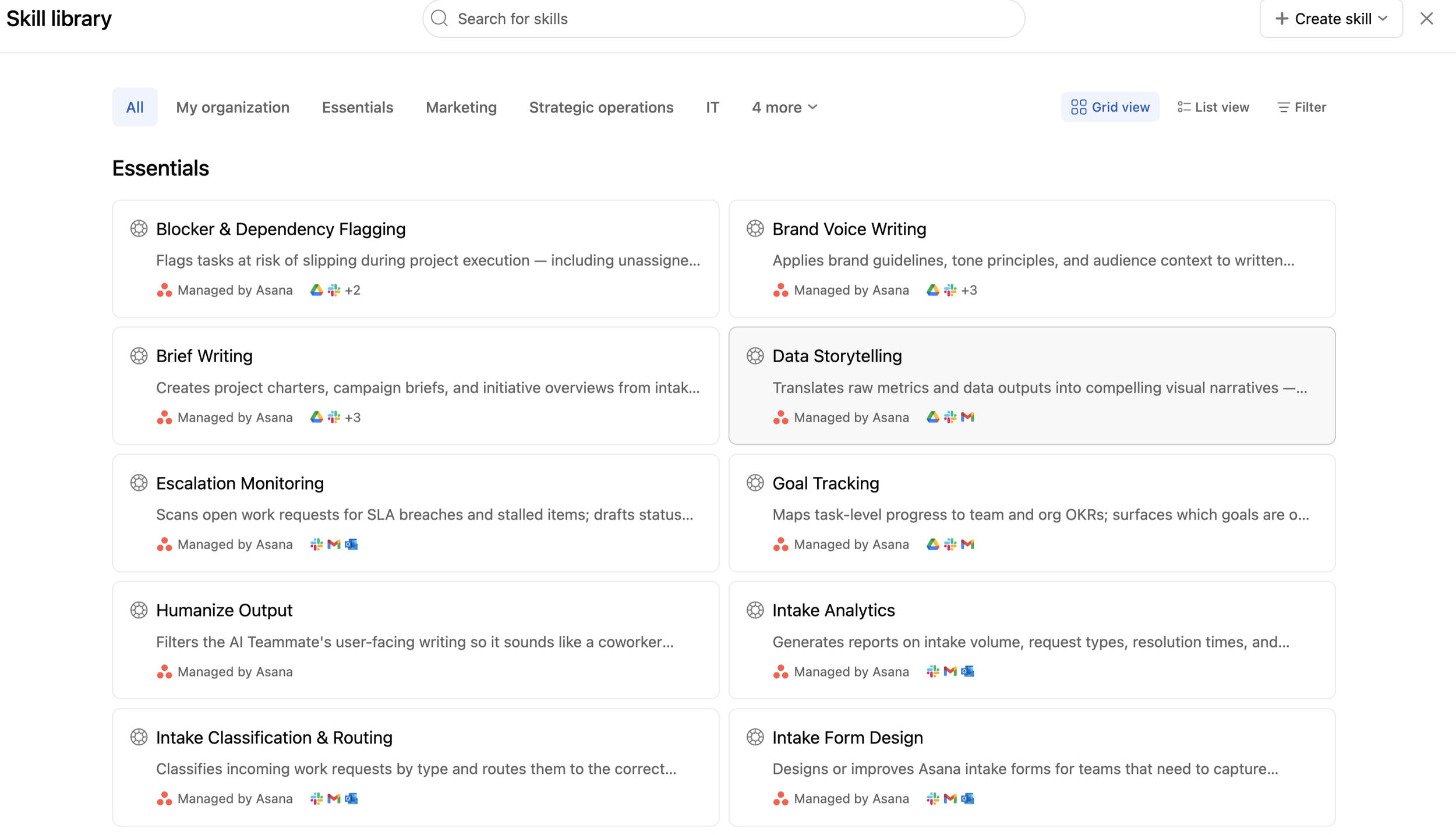
Write skills. Spencer described a skill as a consistent prompt definition that makes an agent do one thing the same way every time, and he mentioned Claude skills as one example. Asana's AI Teammates come with a library of more than 160 skills you can customize. Shared memory helps an agent learn from feedback, but an exact template or a fixed process belongs in a skill.
Add a second agent to check the work. He said this is how agents are trained at AI labs and at Asana. An audit agent reviews what a teammate did, scores it from 1 to 10 and flags problems, and that feedback goes back into the skill and the source of truth.
He was realistic about the effort. Accept that an agent may not be right on the first try, then build a feedback loop that keeps it on track. That loop is where he sees companies reach the next level of AI quality.
Try this week. Name an owner for each source of truth an agent reads, and put a monthly review on their calendar.
6. Govern AI agents like people
The simplest model for AI agent governance is the one you already use for people: scoped access, admin controls and a record of what they did. Spencer called the fear around giving agents access a valid concern for every enterprise.
Asana's answer was a deliberate design choice to make AI Teammates human-shaped. They are literally users of Asana, so they get the same scoped access to projects and portfolios, the same admin controls over access, spend and licences, and a full audit of everything they touch. Asana's research post sums it up as a named identity, scoped permissions and an audit trail for every AI Teammate.
"You kind of get governance for free when you deploy your agents in Asana," Spencer said. He contrasted that with simply giving an agent access to Slack, since the work graph already surrounds a teammate with far more infrastructure.
Marquis asked if teams need someone whose whole job is managing agents, and Spencer answered yes and no. Very large, scaled environments may benefit from an expert. Agents are multiplayer, though, and a human-shaped teammate takes work through tasks and comments, so everyone on the team should be comfortable working with one.
Marquis also floated a teammate that manages other teammates. Spencer said Asana talks about this often for Dash, its AI assistant, and called it an area of active investment.
Governance starts with knowing what's already in use. When Marquis audited Cirface's own AI use, he found 15 AI tools in use and only 3 approved. Our AI governance program sets up the guardrails in 6 to 10 weeks.
Try this week. List every agent and AI tool your team uses, what each one can see and who approved it.
7. Hand agents the continuous work
Agents shine on work that never stops, the steady coordination people usually leave until a deadline forces it. Spencer made the point through work about work, the coordination Asana has long tried to reduce.
Moving work into one place cuts the truly unnecessary parts, such as the constant jumps between email, Slack and doc tools. But "there is some work about work that is just work." Communication and coordination are part of every process, and that remaining time is where he sees AI making the biggest difference.
One of his examples came from manufacturing. Compliance on a factory floor often works like doing your taxes, a year-end fire drill to gather evidence from across the year. A compliance manager teammate works continuously instead. It knows what evidence it needs, files documentation in the right place as it comes in and has the job done when the check arrives.
"I love this idea of outsourcing continuous work to an agent," Spencer said. His personal version is a teammate that logs what he worked on and its impact every week, so at review time he summarizes instead of trying to remember who he talked to and what each project was.
He'd love to cut his own work about work by about an hour a day. Marquis hoped leaders would give that time back to their teams as space to reflect, iterate and take breaks.
Try this week. Find one year-end or quarter-end fire drill on your team and ask what an agent could collect along the way.
Two practical tips from the Q&A
Two quick answers from the session can save teams real trouble.
Trim what you feed an agent. An audience member asked if AI Teammates read some file formats better than others. Spencer said formats are equivalent at a base level, because Asana converts everything into a form the model can read. The bigger factor is volume, since models are still limited by their context windows. Cut a 100-slide deck to the slides that matter, export only the spreadsheet tab you need or give the agent a way to search the material.
Let Asana manage the models for AI Teammates. AI Studio picks a model by default and lets you choose your own, which Spencer called a power-user feature. AI Teammates don't offer that choice beyond global settings for which AI providers you allow. One task can spawn dozens of sub-agents on different models, and Asana tests new models against its evaluation suite and ships any that perform better in less than a week.
Where to start with AI agents in Asana
Spencer's advice for teams new to AI is to start with one question in Dash, Asana's AI assistant. Ask it, "What should I work on this week?" Then ask what your team should work on, and which projects AI Teammates could help with.
He said Dash will point to out-of-the-box teammates and the kinds of tasks you repeat a lot. Marquis added that this line of questions is also a good way to win leadership buy-in. Our guide to Asana Dash walks through five things to try first.
Spencer also previewed what's next. Asana is doubling down on shared memory, and he described shared skills that many AI Teammates can use, plus teammates that update and write back to their own skills. His goal is an agent that has become an invaluable member of the team a month after you onboard it, and for that to happen automatically.
Asana's Work Innovation Summit in New York took place on October 14, 2026, so check what's new for what has shipped before you plan around it. You can watch the full conversation on the Asanathon replay page.
Cirface is an Asana Platinum Solutions and Services Partner and a two-time Asana Partner of the Year for the Americas. If you want help deciding where agents fit in your workflows, book a call with our team.
Frequently asked questions about AI agents
What are AI agent best practices?
Give agents whole jobs, start with work that has clear inputs and outputs, and keep their source of truth current. Spencer Herrick, Asana's AI product lead, also recommends writing skills for anything that must be done the same way every time. Add a second agent to check the work, and govern agents with the same scoped access and audit trail you use for people.
What tasks should you give an AI agent first?
Start with intake, status monitoring and high-volume actions you repeat at a consistent rate. These jobs have clear inputs and outputs, so you can judge the results. Avoid work judged on fuzzy criteria until you can describe what done looks like. A quick test is to ask if you could explain the job to a new intern.
How do you keep AI agents accurate?
Name a gold-standard project or document where your team records what it knows and logs decisions, and give it an owner. Capture fixed templates and processes as skills so the agent repeats them the same way. Use a second agent to review the work, score it and flag problems, then feed that back into the skills and the source of truth.
What is AI agent governance?
AI agent governance is the set of controls that decides what an agent can see, what it can do and how its actions are recorded. In Asana, AI Teammates are set up like human users, with scoped access, admin controls and an audit trail. That lets you manage agents with the permissions and reviews you already use for people.
Do you need a dedicated person to manage AI agents?
It depends on scale. Spencer Herrick, Asana's AI product lead, said very large organizations may benefit from an expert who designs and evaluates agents. Day to day, everyone on the team should be comfortable assigning work to an agent and giving it feedback through tasks and comments.
What is sidecar AI?
Sidecar AI is Spencer Herrick's term for AI features added to an existing product without changing how work gets done. Those features can make people faster, but they rarely ship projects faster. Agents built on a shared source of truth, such as Asana's work graph, can take on whole processes instead.
Can you choose the AI model for Asana AI Teammates?
You can't pick one directly. Asana manages the models for AI Teammates, beyond global settings for which AI providers you allow, because one task can run dozens of sub-agents on different models. AI Studio picks a model by default and lets power users choose their own.